Understand Kubernetes services like ClusterIP, NodePort, LoadBalancer, and Ingress. Learn their differences and best use cases for your applications.

TL;DR
- ClusterIP is the default Kubernetes service type, providing internal-only networking between pods within the cluster using stable virtual IP addresses.
- NodePort extends ClusterIP by opening a static port (30000 to 32767) on every node, enabling external access but with limitations for production use.
- LoadBalancer provisions cloud provider load balancers automatically, offering production-ready external access with Layer 4 routing for HTTP, TCP, UDP, and other protocols.
- Ingress provides Layer 7 HTTP/HTTPS routing with advanced capabilities like host-based rules, path-based routing, and SSL termination while using only one load balancer.
- Service selection depends on whether you need internal cluster communication (ClusterIP), simple external demos (NodePort), cloud-based external access (LoadBalancer), or sophisticated HTTP routing (Ingress).
Understanding ClusterIP, NodePort, LoadBalancer, and Ingress
Kubernetes has emerged as a powerful tool to manage and scale cloud-native applications. Organizations need to deploy their software quickly, leveraging highly-scalable and always available capabilities to maintain zero downtime. As more applications are containerized and deployed, it becomes increasingly complex for any organization to manage these containers. Hence, scaling becomes an issue. This is where Kubernetes shines. With Kubernetes, you can easily automate, deploy, scale, and monitor your applications.
If you’ve read any documentation about Kubernetes services and networking, you’ve probably come across the terms ClusterIP, NodePort, LoadBalancer, and Ingress. There seems to be a lot of confusion around these terms, and you must understand the difference before you start building your next Kubernetes-based application.
This tutorial will explain the difference between these four Kubernetes service types, and how you should choose the best one for your application.
Understanding Networking Requirements for Your Application
Kubernetes networking and services are a complex topic. You need to understand the needs of your application in order to successfully deploy it on Kubernetes. This means understanding the type of service you want to provide, the size and location of your cluster, and what kind of traffic you expect your application to receive.
There are four types of services that Kubernetes supports: ClusterIP, NodePort, LoadBalancer, and Ingress. Each has their own set of requirements to enable them for your application, so you must understand which one you need before deploying. For example, NodePort exposes a service on the same static port on every node, so you can reach it from outside the cluster by connecting to any node's IP and that port. It does not need two nodes and it is not limited to internal traffic. ClusterIP is the type that only works from inside the cluster.Let’s go through each to understand how they work.
ClusterIP

ClusterIP is the default service that enables the communication of multiple pods within the cluster. By default, your service will be exposed on a ClusterIP if you don't manually define it. ClusterIP can’t be accessed from the outside world. But, a Kubernetes proxy can be used to access your services. This service type is used for internal networking between your workloads, while debugging your services, displaying internal dashboards, etc.
NodePort
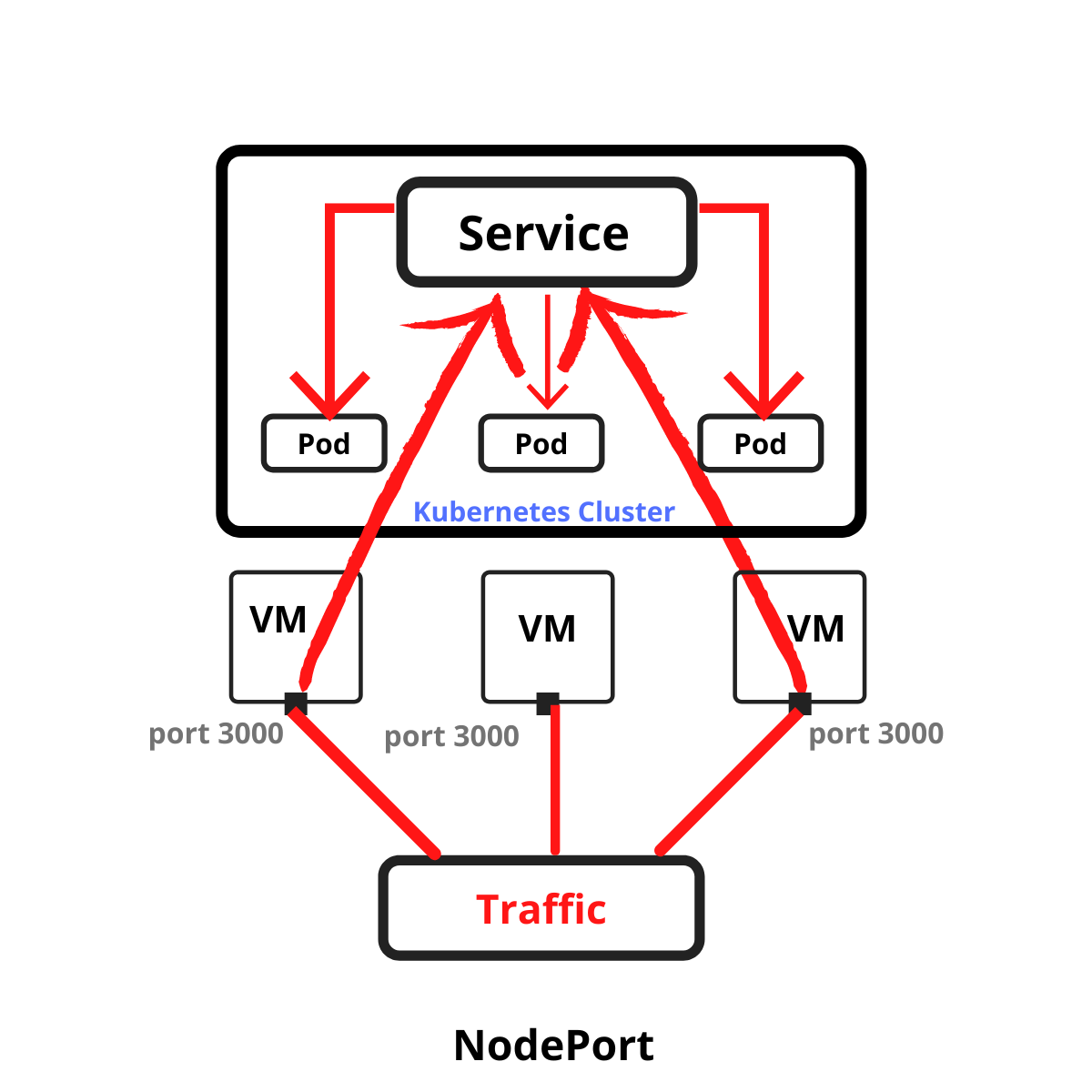
A NodePort is the simplest networking type of all. Kubernetes opens the same port on every node (30000 to 32767 by default, assigned for you unless you pick one) and forwards traffic on that port to the pods behind the service. It is simple to set up, but it does have some disadvantages:
- You may need to use a reverse proxy (like Nginx) to ensure that web requests are routed correctly.
- You can only expose one single service per port.
- Container IPs will be different each time the pod starts, making DNS resolution impossible.
- The container cannot access localhost from outside of the pod, as there is no IP configured.
Nevertheless, you can use NodePort during experimentation and for temporary use cases, such as demos, POCs, and internal training to show how traffic routing works. It is recommended not to use NodePort in production to expose services.
LoadBalancer

LoadBalancer is the most commonly used service type for Kubernetes networking. It is a standard load balancer service that your cloud provider provisions outside the cluster. It gives the service an external IP address and sends traffic from outside, such as the Internet or your datacenter, to the pods behind it.
The LoadBalancer will keep connections open to pods that are up, and close connections to those that are down. This is similar to what you have on AWS with ELBs, or Azure with Application Gateway. Upstreams provide Layer 4 routing for HTTP(S) traffic, whereas Downstreams provide Layer 7 routing for HTTP(S) traffic.
You can route traffic on destination port number, protocol and hostname, or use application labels. You can send almost any kind of traffic to this service type, such as HTTP, TCP, UDP, Grpc, and more. Use this approach to expose your services directly.
Ingress

Ingress is not considered an official Kubernetes service, but it can be used to expose services. You can configure an Ingress service by creating rules to define which inbound connections should reach which services.
An Ingress is a Kubernetes object that sits in front of multiple services and acts as an intelligent router. It defines how external traffic can reach the cluster services, and it configures a set of rules to allow inbound connections to reach the services on the cluster.
Ingress rules are typically defined by annotations. The Ingress controller reads these annotations and configures iptables or NGINX accordingly. There are many types of Ingress controllers that possess different capabilities. You can find the list of ingress controllers here.
Ingress is the most powerful service type used to expose services, and it only requires you to maintain one load balancer, which can be cheaper than using a LoadBalancer service type.
Here is a simple comparison table to help you understand the service types at a quick glance.

Conclusion: Kubernetes is a Must in the Cloud-Native World
Kubernetes is a powerful tool for automating and managing your IT infrastructure. It gives you the ability to group related parts of your infrastructure, giving them their own “node” in the cluster, making them easier to manage, monitor, and update.
As Kubernetes adoption is skyrocketing, it has become a must-know platform for developers and enterprises to be competitive in the cloud-native space.
The Harness Platform is built with all the capabilities to supercharge your Kubernetes deployments with ease. Harness has an intuitive dashboard where you can easily configure your deployment stage, target infrastructure, and execution strategy. Request your demo today.
We would love to be a part of your journey, as we use Kubernetes intensively at Harness. Looking to get started? We have a quickstart guide on Kubernetes that will help you deploy your first application using Harness CD.