Learn all about CI/CD pipelines, their elements, benefits, and best practices to streamline your software delivery process. | Blog

TL;DR
- CI/CD pipelines automate software delivery from source code to production, eliminating manual handoffs and reducing deployment risk.
- Modern pipelines integrate build automation, security scanning, testing orchestration, and AI-powered deployment verification in a single workflow.
- Elite teams achieve sub-one-hour lead times and below-15% change failure rates by optimizing pipeline speed and reliability. [Source: DORA State of DevOps Report, 2024, dora.dev/]
- Deployment strategies like canary, blue-green, and rolling releases allow teams to ship incrementally while maintaining production stability.
- AI capabilities like Test Intelligence and Cache Intelligence can reduce test execution time and accelerate builds without sacrificing quality.
CI/CD Pipelines and Software Delivery
A CI/CD pipeline is an automated workflow that builds, tests, and deploys software changes from source code to production. It helps engineering teams release faster, reduce manual work, and improve software quality.
Here's the uncomfortable truth: writing code has never been faster, but actually shipping it? That's another story.
AI coding assistants have supercharged development speed. Yet Google's DORA report shows delivery throughput remains stubbornly flat while stability is actually decreasing. The bottleneck has shifted from writing code to getting it safely into production.
This is where CI/CD pipelines come in. Continuous Integration (CI) automates code integration, builds, and early validation, such as unit tests. Continuous Delivery or Continuous Deployment extends automation through testing, artifact promotion, and release workflows into target environments.
Together, a well-designed CI/CD pipeline is the backbone of any DevOps pipeline—the critical path determining whether your ideas actually reach customers or get stuck waiting in queues.
Before and After CI/CD
Without CI/CD, teams often work in isolation. Developers maintain separate feature branches for weeks before merging. Testing happens manually at the final stages, and releases become big-bang events that take days to coordinate. Dev, test, and ops work in silos, bugs surface late when they're expensive to fix, and every deployment feels like a high-risk event.
With CI/CD, the workflow transforms. Developers commit frequently to shared branches, and automated testing runs on every push. Releases become smaller and more frequent. Teams collaborate throughout the process rather than handing off between stages. Bugs are caught early when they're cheap to fix. And instead of dreading deployments, teams gain the confidence to ship multiple times per day.
The difference isn't just speed. It's the shift from reactive firefighting to proactive, predictable delivery.
What is a CI/CD Pipeline?
A CI/CD pipeline is a series of orchestrated steps with the ability to transform source code into software and take it all the way into production. These steps include building, packaging, testing, validating, verifying infrastructure, and deploying into all necessary environments.
Depending on your organizational and team structures, you might need multiple pipelines to achieve this. A CI/CD pipeline can be triggered by events like a pull request, a new artifact appearing in a repository, or a scheduled release cadence.

CI/CD platforms are purpose-built to manage this cross-discipline orchestration. Pipelines can be represented as code, often in declarative formats like YAML, making them versionable, repeatable, and easy to share across teams.
What's changed recently is how these pipelines get built and run. Modern DevOps platforms now use AI to generate production-ready pipelines from natural language, optimize test execution with intelligence that skips irrelevant tests, and automatically verify deployments by analyzing live metrics and rolling back failures before customers notice. This shifts CI/CD from a manual scripting exercise to an intelligent, self-service capability.
Benefits of CI/CD Pipeline
DevOps activities could each be invoked as unrelated jobs where security scans are run in a security tool, builds are run on a build server, and deployments are run in a release automation system. When we integrate these activities into a coherent pipeline, the data can be shared, making everything from automation to decision-making to visibility easier.
By taking a modern pipeline-driven approach to CI/CD that standardizes pipelines with templates and policy as code, teams gain:
- Speed and consistency. Pipelines execute multiple times daily without manual coordination. Citi can now "release each change within minutes of a pull request being merged."
- Reduced DevOps toil. Pipeline templates eliminate bespoke work for each application. Ancestry saw an "80-to-1 reduction in developer effort" by building features once and extending them across every pipeline.
- Built-in governance and compliance. Policy-as-code and approval workflows are embedded directly into delivery. Audit logs generate automatically, making compliance a byproduct of your normal workflow.
- Visibility into bottlenecks. Systematic pipelines reveal exactly where things slow down, replacing guesswork in disjointed, handoff-heavy processes.
- Lower infrastructure costs. Automated pipelines optimize resource usage. Burst SMS cut infrastructure costs by 76%, saving over $80,000 annually after moving to Harness CI.
Goal of your CI/CD Pipeline
There can be many goals represented in a CI/CD pipeline. The structure of a CI/CD pipeline tends to follow the goals that drive it.
Driven by Environments
As systems become more distributed, the number of locations a service needs to be deployed to increases. If your main goal is to deploy to multiple environments/locations, your CI/CD pipelines will tend to be more deployment-centric, favoring the orchestration of all the environments a service has to traverse through.
Driven by Tests
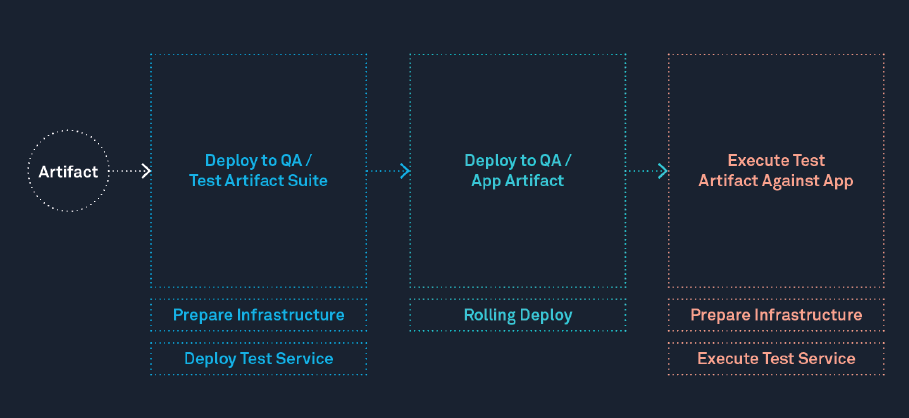
Test automation and orchestration are popular uses of CI/CD pipelines. Having to chain together several different testing methodologies, a natural home for the automation to progress the testing is in your pipeline. As testing rigor increases, longer “time per stage” occurs as the pipeline gets closer to production.
Driven by Services
With the rise of microservices, deployments tend to include more than one service. If the pipeline is used for service orchestration, several services in parallel (or sequentially) need to be deployed. These pipelines are often used to coordinate multiple services and maintain consistency across their deployments.
Driven by Outcome
Eventually, the feature has to match the expectation. Pipelines that focus on outcomes don't end when the deployment is over. They continue monitoring production for regression, tracking SLAs/SLOs/SLIs, and using AI verification to detect anomalies that may surface hours or days after a change goes live. If something goes wrong, the pipeline becomes a conduit for automated rollback and faster MTTR.
Driven by Self-Service with Guardrails
Before there were pipelines, people were highly involved with progressing deployments. While manual approval gates still have their place, modern pipelines shift toward developer self-service backed by policy-as-code. Platform teams define guardrails and governance rules, then empower developers to run their own pipelines without bottlenecks. This approach threads the needle between speed and safety.
Driven by AI and Intelligence
The newest generation of pipelines leverages machine learning throughout the delivery lifecycle. This includes intelligent test selection that skips irrelevant tests, caching optimization that accelerates builds, AI-powered deployment verification that detects regressions in real time, and automated rollback when something goes wrong. These pipelines learn and adapt, reducing manual effort while increasing reliability.
CI/CD Pipeline Elements
Typical building blocks in CI/CD pipelines encompass the gamut from source code to being deployed into production.
Build Elements
Source code must be built and packaged before it can be deployed. CI tools automate this phase of the pipeline. Because this process is language-dependent, the CI pipeline must invoke the specific build tools required by the application.
For example, a pipeline might use Maven or Gradle to compile a Java application. This phase often includes packaging; for instance, after compiling the Java artifact, the pipeline might run docker build to package the application into a Docker container image. Finally, the build stage is also the ideal place to execute unit tests and dependency scans to ensure code quality.
Legacy CI platforms were often fast because they reused “dirty” build directories and could leverage simple caching. Modern CI platforms have better build isolation and need more advanced optimizations. The speed performance is achieved through optimizations like Cache Intelligence (automatic dependency caching), Build Intelligence (incremental builds), and Test Intelligence (test avoidance). Many also generate Software Bills of Materials (SBOMs) to support supply chain security.
Infrastructure Elements
Modern generations of CI/CD pipelines are infrastructure-aware. Compared to pipelines of the past, where infrastructure was waiting ahead of an application deployment, with the rise of infrastructure-as-code, now the infrastructure may be provisioned during pipeline execution. The success or failure of the infrastructure provisioning gates the progression of the CI/CD pipeline. As an artifact progresses through environments, infrastructure provisioning, such as executing OpenTofu or Terraform scripts or calls to an infrastructure-as-code management tool, to ready the next environment(s).
GitOps Elements
GitOps treats Git as the single source of truth for the desired state. Rather than pushing changes directly, sync mechanisms (like Argo CD) continuously reconcile environments to match what's declared in Git. This provides a complete audit trail and simplifies rollbacks to a single commit revert.
Test Elements
A major goal of most pipelines is to instill confidence. The textbook approach to instill confidence in software is to run tests. Test elements come in many shapes and forms. As test methodologies evolve, CI/CD pipelines are natural places to execute the tests as quality gates. Above and beyond build-centric tests, tests that require application in its entirety, such as integration tests, soak tests, load tests, and regression tests, are natural fits. Modern testing approaches, such as Chaos Engineering, can extend to infrastructure levels as well.
Test Intelligence takes this further by analyzing code changes to run only relevant tests, cutting test cycles without sacrificing coverage.
Security Elements
Modern pipelines shift security left by integrating scanning throughout delivery: static analysis (SAST), dependency scanning (SCA), container image scanning, and secrets detection. For supply chain security, pipelines can enforce SLSA compliance by generating provenance attestations and verifying artifact integrity.
Release Elements
Release elements are the parts of a CI/CD pipeline responsible for deploying software changes. Need to deploy in a rolling, blue-green, or canary fashion? Release elements in your CI/CD pipeline will take care of that orchestration.
As organizations adopt microservices, a single business feature often requires coordinating changes across many services owned by different teams. Enterprise release orchestration solves this "pipeline of pipelines" challenge by managing dependencies, sequencing deployments, and maintaining visibility across the entire release. This goes beyond individual pipelines to orchestrate all automated and manual activities from branch-cut to production.
Rolling Deployment
A rolling deployment is a release strategy where running instances are updated in a sequence. To expand on that, the old application version is brought down, and then a new version is brought up in its place until all nodes in the sequence are replaced.
Blue-Green Deployment
A blue-green deployment is a release strategy designed for safety. With two parallel versions of production running, the new release (blue) will replace the stable version (green) via a load balancer that keeps the stable version running until it is deemed safe to repurpose or decommission it. Implementing blue-green deployments makes rollbacks much easier. Though on the flip side, the infrastructure required (two copies of production) can be costly to provision and run.
Canary Deployment
A canary deployment is an incremental release strategy where the new change (the canary) is incrementally rolled out, eventually replacing the stable version. Canary deployments are run in multiple phases. For example, the first phase might swap 10% of the nodes, and upon success, it increases to 50% of the nodes, and then finally, 100% of the nodes. The main reasons to implement canary deployments are the safety they provide during a release, and also using fewer resources than a blue-green deployment. On the flip side, canary deployments can be complex due to the validation needed to promote canaries.
Verification Elements
Verification doesn't stop when deployment finishes. Modern CD pipelines integrate with observability tools to continuously monitor application health and detect regressions that surface hours or days after a release.
The most advanced platforms use AI verification to automatically analyze metrics, logs, and traces, comparing the new deployment against baseline performance. Machine learning models detect anomalies that humans might miss: subtle increases in error rates, latency degradation, or resource consumption spikes. When problems are detected, AI-powered rollback reverts to the last stable version automatically, often before customers notice any impact.
This safety net changes the risk calculus for deployments. Teams can increase deployment frequency knowing that the system will catch failures and recover without manual intervention. Instead of deploying cautiously once a week, teams can ship multiple times per day with confidence.
GitOps and CI/CD Pipelines
GitOps has become a popular approach for Kubernetes teams. Git becomes the single source of truth for both application code and infrastructure configuration. Instead of pushing changes directly, you declare the desired state in Git, and sync tools such as Argo CD continuously reconcile your environments to match. Rollbacks become as simple as reverting a commit.
Many people think that GitOps invalidates pipelines; however, GitOps is primarily an operating and deployment model for managing infrastructure and application configuration through Git. It complements CI/CD, but does not replace the broader delivery workflows many teams need. While GitOps excels at syncing the desired state, it lacks the context to handle the full lifecycle, such as performing builds, running security tests, making release decisions, or updating tickets in Jira. You still need a workflow engine to orchestrate the 'before' and 'after' logic around the sync. CI/CD pipelines that integrate with GitOps reconcillers like Argo CD are a good fit for that.
Characteristics of Good CI/CD Pipelines
Good pipelines are fast and repeatable. Great pipelines are fast, secure, and repeatable.
The book Accelerate established benchmarks that still guide high-performing teams: elite performers have a lead time of less than one hour from commit to production and a change failure rate below 15%. If your code takes longer than an hour to reach production, or if more than two out of ten deployments fail, it's time to reconsider your CI/CD pipeline design.
Here's what leading teams are achieving with modern CI/CD platforms:
- Faster pipeline creation: Pipelines created in minutes instead of days, with up to 85% reduction in onboarding time.
- Faster builds: Cache Intelligence and Build Intelligence deliver up to 4x faster builds.
- Faster tests: Test Intelligence can cut test cycles by up to 80% by running only relevant tests.
- Faster recovery: AI-powered verification and rollback can reduce Mean Time to Resolution (MTTR) by up to 60%.
Security is equally critical. Great pipelines run builds in isolated environments, generate provenance for artifact integrity, and integrate security scans at every stage. Compliance should be a byproduct of your pipeline, not a separate audit.
How Automated CI/CD Pipelines Help Developer Teams
In modern organizations, the CI/CD pipeline is the mechanism that moves developer code toward production safely and consistently. Software engineering is an iterative exercise, and by having automated CI/CD pipelines, engineers are able to execute the pipelines without human intervention.
The key is balancing self-service with governance. Flexible templates let platform teams standardize the 90% that should be consistent (security scans, approval gates, deployment strategies) while giving developers controlled flexibility for the remaining 10%. Developers own their delivery while automatically complying with organizational policies.
The best CI/CD platforms also enhance the developer experience: faster builds through intelligent caching, AI-powered troubleshooting that explains failures and suggests fixes, and less toil through reusable automation. This isn't another tool imposed by management. It's the infrastructure that makes developers more productive.
Automate your CI/CD Pipeline with Harness
With the Harness software delivery platform, automating your CI/CD pipeline is achievable for anyone and any organization. Harness leverages context-aware AI to automate the entire delivery lifecycle: generate production-ready pipelines using natural language, accelerate builds with Cache Intelligence, cut test cycles with Test Intelligence, and automatically detect and roll back failed deployments.
Harness helps tackle the hardest CI/CD challenges, such as onboarding new technologies, validating/promoting your deployments, and actions in failure scenarios. All of the orchestration that is needed in the form of tests, approvals, and validation are easily connected in the Harness platform. Automate the build, test, and packaging of code to artifacts with Harness Continuous Integration, and build deployment pipelines in minutes while safely deploying artifacts to production with Harness Continuous Delivery.
Ready to look into CI/CD solutions? Get a copy of our CI/CD Buyer's Guide today.
CI/CD Pipeline: Frequently Asked Questions
Got questions about CI/CD pipelines? Here are answers to the most common ones we hear from development and platform engineering teams.
What's the difference between CI/CD and a CI/CD pipeline?
CI/CD refers to the practices of Continuous Integration and Continuous Delivery. A CI/CD pipeline is the automated implementation of those practices: the specific sequence of steps that build, test, and deploy your code.
How long should a CI/CD pipeline take to run?
Elite performers achieve lead times of less than one hour from commit to production. Others take days or weeks to ship. If your pipeline takes longer than you’d like, look for bottlenecks in test execution, build times, or manual approval gates. Features like Test Intelligence and Cache Intelligence can dramatically reduce pipeline duration.
What's the difference between continuous delivery and continuous deployment?
Continuous delivery ensures code is always in a deployable state, with a manual approval before production. Continuous deployment removes that gate, automatically deploying every change that passes the pipeline. Most enterprises start with continuous delivery and move toward continuous deployment as confidence grows.
What is GitOps and how does it relate to CI/CD?
GitOps uses Git as the single source of truth for infrastructure and application configuration. While traditional CD pushes changes to environments, GitOps pulls desired state from Git and reconciles automatically. Many teams combine GitOps deployment mechanics with CI/CD pipelines for testing, approvals, and verification.
How can AI improve CI/CD pipelines?
AI enhances CI/CD in several ways: generating pipelines from natural language, selecting only relevant tests to run, optimizing build caching, troubleshooting failures with root cause analysis, and automatically detecting deployment regressions to trigger rollbacks.
How do I secure my CI/CD pipeline?
Shift security left by integrating scanning throughout your pipeline: static analysis (SAST), dependency scanning (SCA), container image scanning, and secrets detection. Use isolated build environments, generate SBOMs for artifact integrity, and enforce policies with policy-as-code. For supply chain security, consider SLSA compliance.
What metrics should I track for CI/CD performance?
The DORA metrics are the industry standard: deployment frequency, lead time for changes, change failure rate, and mean time to recovery (MTTR). Also track pipeline duration, test pass rates, and the number of pipelines managed per engineer.