Featured Blogs
.png)
We’ve come a long way in how we build and deliver software. Continuous Integration (CI) is automated, Continuous Delivery (CD) is fast, and teams can ship code quickly and often. But environments are still messy.
Shared staging systems break when too many teams deploy at once, while developers wait on infrastructure changes. Test environments get created and forgotten, but over time, what is running in the cloud stops matching what was written in code.
We have made deployments smooth and reliable, but managing environments still feels manual and unpredictable. That gap has quietly become one of the biggest slowdowns in modern software delivery.
This is the hidden bottleneck in platform engineering, and it's a challenge enterprise teams are actively working to solve.
As Steve Day, Enterprise Technology Executive at National Australia Bank, shared:
“As we’ve scaled our engineering focus, removing friction has been critical to delivering better outcomes for our customers and colleagues. Partnering with Harness has helped us give teams self-service access to environments directly within their workflow, so they can move faster and innovate safely, while still meeting the security and governance expectations of a regulated bank.”
At Harness, Environment Management is a first-class capability inside our Internal Developer Portal. It transforms environments from manual, ticket-driven assets into governed, automated systems that are fully integrated with Harness Continuous Delivery and Infrastructure as Code Management (IaCM).
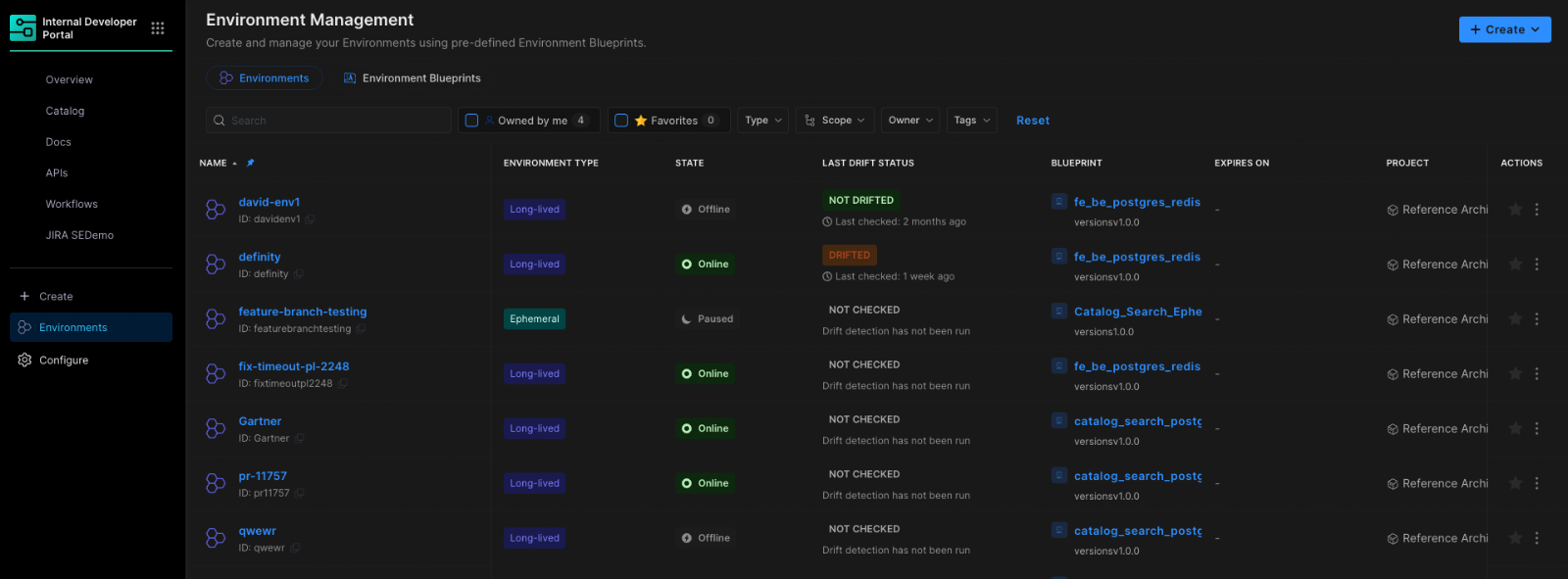
This is not another self-service workflow. It is environment lifecycle management built directly into the delivery platform.
The result is faster delivery, stronger governance, and lower operational overhead without forcing teams to choose between speed and control.
Closing the Gap Between CD and IaC
Continuous Delivery answers how code gets deployed. Infrastructure as Code defines what infrastructure should look like. But the lifecycle of environments has often lived between the two.
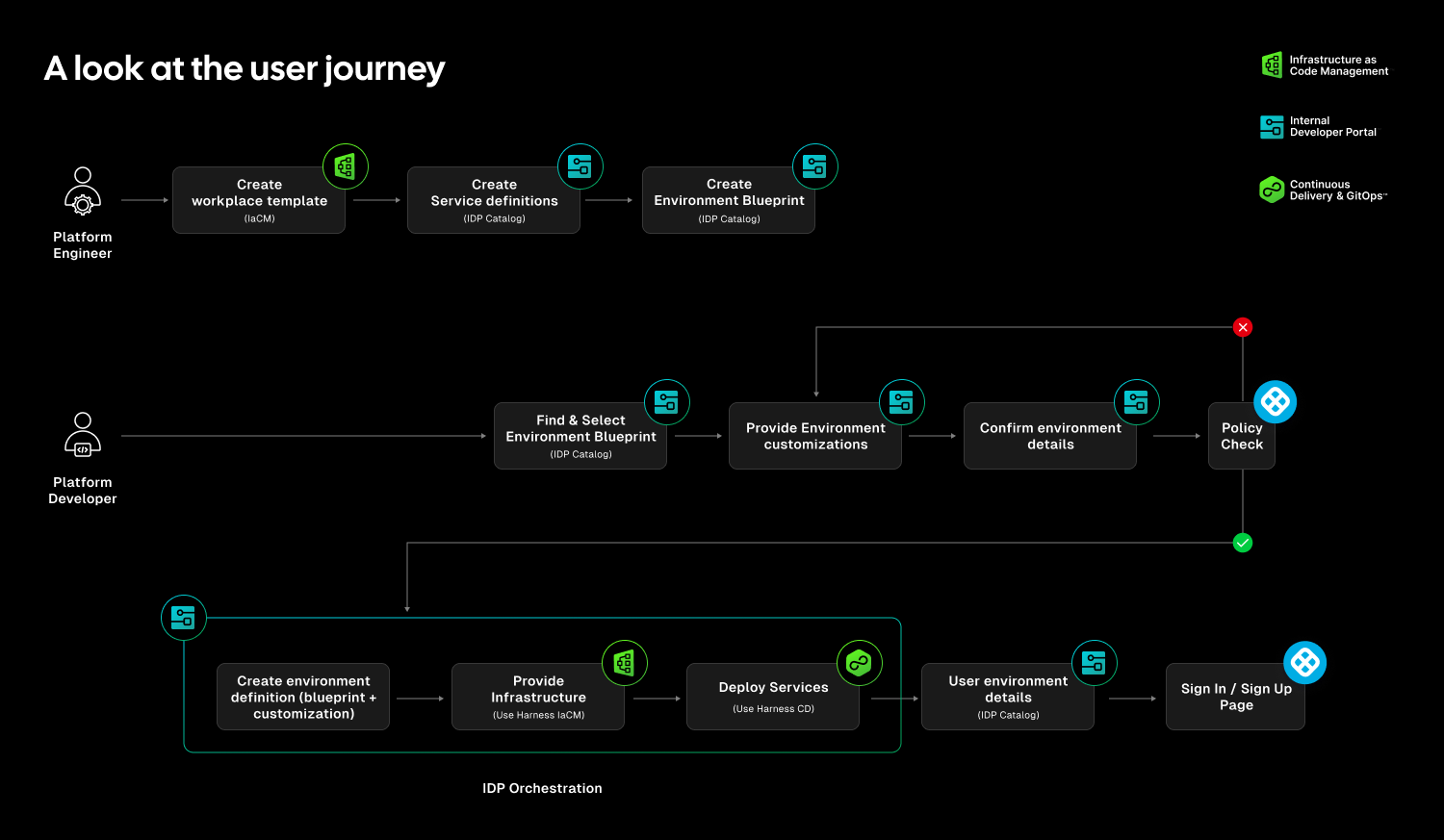
Teams stitch together Terraform projects, custom scripts, ticket queues, and informal processes just to create and update environments. Day two operations such as resizing infrastructure, adding services, or modifying dependencies require manual coordination. Ephemeral environments multiply without cleanup. Drift accumulates unnoticed.
The outcome is familiar: slower innovation, rising cloud spend, and increased operational risk.
Environment Management closes this gap by making environments real entities within the Harness platform. Provisioning, deployment, governance, and visibility now operate within a single control plane.
Harness is the only platform that unifies environment lifecycle management, infrastructure provisioning, and application delivery under one governed system.
Blueprint-Driven by Design
At the center of Environment Management are Environment Blueprints.
Platform teams define reusable, standardized templates that describe exactly what an environment contains. A blueprint includes infrastructure resources, application services, dependencies, and configurable inputs such as versions or replica counts. Role-based access control and versioning are embedded directly into the definition.
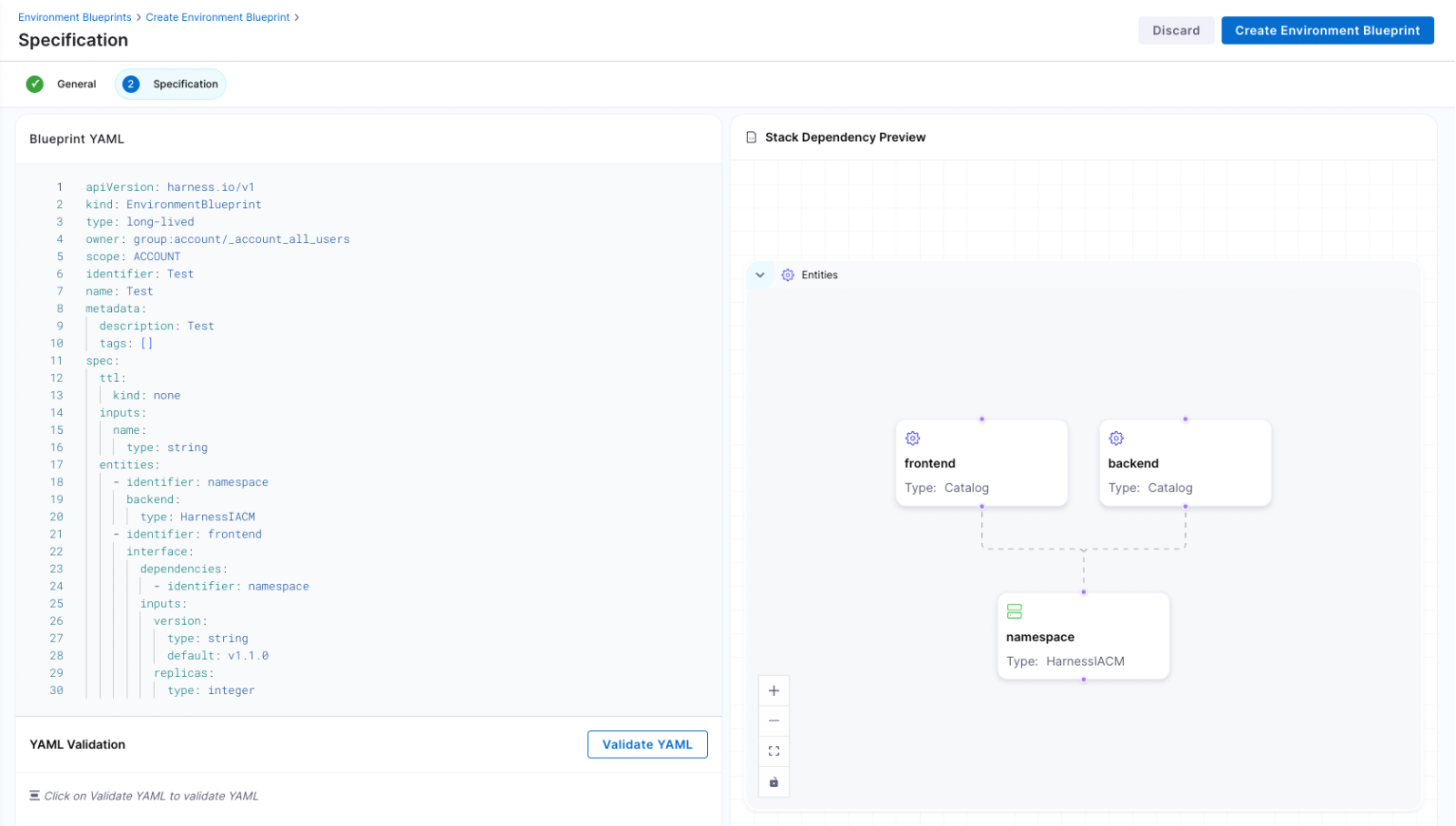
Developers consume these blueprints from the Internal Developer Portal and create production-like environments in minutes. No tickets. No manual stitching between infrastructure and pipelines. No bypassing governance to move faster.
Consistency becomes the default. Governance is built in from the start.
Full Lifecycle Control
Environment Management handles more than initial provisioning.
Infrastructure is provisioned through Harness IaCM. Services are deployed through Harness CD. Updates, modifications, and teardown actions are versioned, auditable, and governed within the same system.
Teams can define time-to-live policies for ephemeral environments so they are automatically destroyed when no longer needed. This reduces environment sprawl and controls cloud costs without slowing experimentation.
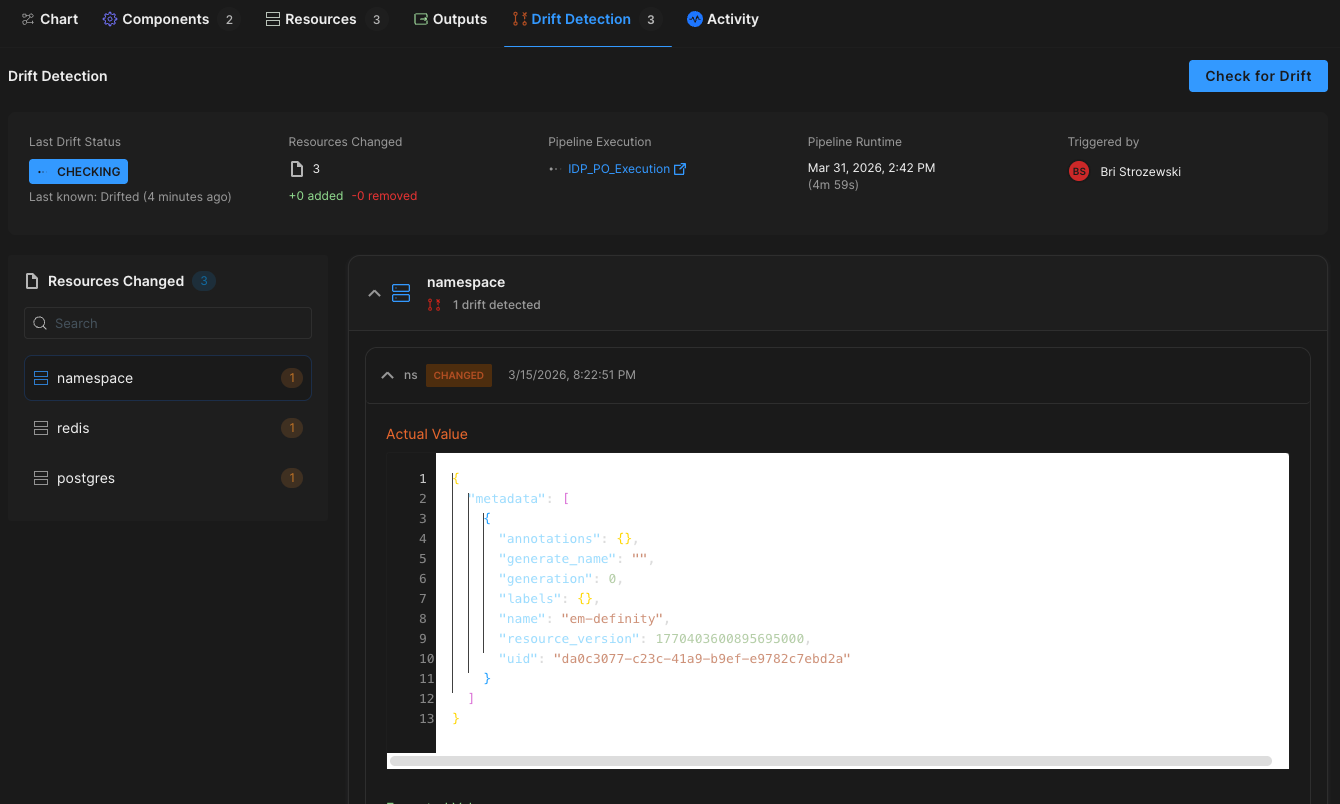
Harness EM also introduces drift detection. As environments evolve, unintended changes can occur outside declared infrastructure definitions. Drift detection provides visibility into differences between the blueprint and the running environment, allowing teams to detect issues early and respond appropriately. In regulated industries, this visibility is essential for auditability and compliance.
Governance Built In
For enterprises operating at scale, self-service without control is not viable.
Environment Management leverages Harness’s existing project and organization hierarchy, role-based access control, and policy framework. Platform teams can control who creates environments, which blueprints are available to which teams, and what approvals are required for changes. Every lifecycle action is captured in an audit trail.
This balance between autonomy and oversight is critical. Environment Management delivers that balance. Developers gain speed and independence, while enterprises maintain the governance they require.
"Our goal is to make environment creation a simple, single action for developers so they don't have to worry about underlying parameters or pipelines. By moving away from spinning up individual services and using standardized blueprints to orchestrate complete, production-like environments, we remove significant manual effort while ensuring teams only have control over the environments they own."
— Dinesh Lakkaraju, Senior Principal Software Engineer, Boomi
From Portal to Platform
Environment Management represents a shift in how internal developer platforms are built.
Instead of focusing solely on discoverability or one-off self-service actions, it brings lifecycle control, cost governance, and compliance directly into the developer workflow.
Developers can create environments confidently. Platform engineers can encode standards once and reuse them everywhere. Engineering leaders gain visibility into cost, drift, and deployment velocity across the organization.
Environment sprawl and ticket-driven provisioning do not have to be the norm. With Environment Management, environments become governed systems, not manual processes. And with CD, IaCM, and IDP working together, Harness is turning environment control into a core platform capability instead of an afterthought.
This is what real environment management should look like.
.png)
Self-service has become the default answer in platform engineering.
Need a new service? Click a button. Need infrastructure? Run a workflow. Need an environment? Fill out a form. Internal Developer Portals (IDPs) promise a simple trade: fewer tickets, faster teams, happier developers. And for a while, it works.
Developers get what they need without waiting. Platform teams see ticket volume drop. Everyone feels like they’re moving faster.
But then something strange happens. A few months later, teams are still clicking buttons, yet platform engineers are back to answering questions. Environments are piling up. Costs are creeping up. Security reviews take longer. And developers start opening tickets again.
Not because self-service is bad, but because self-service workflows were asked to solve a bigger problem than they were designed for.
Here’s the uncomfortable truth many teams run into: self-service workflows are not the same thing as environment management.
The rise of self-service actions
Most IDPs now come with actions or workflows. They let developers trigger something real: run a script, kick off a pipeline, provision a cluster, or create an environment. For platform teams, this is a big improvement over the old model where every request becomes a ticket.
Self-service actions are helpful because they remove the first bottleneck: the wait. Instead of asking “Can someone please set up my environment,” a developer can request it directly and get an answer right away. This is why so many organizations start their environment journey with workflows. And for Day 1, it feels like the problem is solved.
Day 1 feels great. Day 2 is where reality shows up
Day 1 is the moment an environment is created. Day 2 is everything that happens after.
In the first few weeks, everything feels under control. Environments are created only when someone needs them, and people still remember why each one exists. Costs stay within expectations, and security teams don’t have much reason to pay attention. From the outside, it looks like the platform team delivered exactly what the business wanted.
But environments don’t stop being work after they’re created. They get used, tweaked, shared, copied, and forgotten. Requirements change, teams change, and the environment that was “temporary” turns into something that lives for months.
That’s when Day 2 arrives. It doesn’t arrive like a deadline, it arrives like a question:
- “Can we scale this up for testing?”
- “Is it safe to change this config?”
- “Who owns this environment?”
- “Can I delete it?”
- “Why is this still running?”
These are not creation problems, but they are lifecycle problems.
The hidden blind spot: workflows don’t remember
A workflow is good at doing a task. It runs, it finishes, and it moves on. If you ask it to create an environment, it will do exactly that.
What it usually won’t do is keep the environment understandable over time.
Once the workflow finishes, most systems lose the thread. The environment exists, but the platform no longer has clear answers to basic questions like: Who is responsible for it? What services are supposed to be running there? What rules should apply to it? How long should it live? What does “healthy” even mean?
To the workflow, the environment is output. To the company, it’s a living thing that needs ownership and guardrails.
That gap doesn’t feel dangerous at first, but it becomes dangerous when people start making changes.
Environments quietly become tickets again
Most teams don’t wake up one morning and decide to bring tickets back, but tickets come back slowly.
- First it’s a Slack message: “Hey, can you take a look at this environment?”
- Then it’s a “quick question” in a thread that never ends.
- Next it’s a meeting to figure out what’s safe.
- Then it’s a ticket, because nobody wants to be the person who breaks something important.
Self-service workflows reduced the first wave of tickets: “Please create this.” But if the system doesn’t manage the lifecycle, you get a second wave of tickets: “Please fix this,” “Please change this,” “Please clean this up,” and “Please tell me what this even is.”
The workflow solved the request, but it didn’t solve the lifecycle.
Ownership gets blurry, and blurry ownership creates slow teams
In ticket-based models, ownership is obvious: the platform team owns environments because they create them and maintain them, and self-service changes that. The developer clicks the button, but that does not automatically create real ownership.
Does the developer now own patching? Security updates? Cost controls? Deleting unused infrastructure? If they leave the company, who owns the environment then? If another team depends on that environment, who approves changes?
When ownership is unclear, most teams do the safest thing: they stop making changes unless someone “official” approves it. That “official” person is usually the platform team. That’s how the platform team becomes the bottleneck again, even though self-service still exists.
Drift: the problem that starts as “just this once”
Once an environment is running, small changes start happening. Someone adjusts a setting to debug a flaky test, or changes the replica count because a load test is failing. Someone adds a new dependency because the service now needs a queue or a bucket.
Each change might be reasonable at the moment, but the trouble is that the changes are often made in different places by different people, and they aren’t always captured back into the source of truth.
Over time, environments that started from the same template begin to behave differently. They look similar, but they aren’t identical. Test results become harder to trust, release confidence drops, and developers start saying the phrase every platform team hates: “It worked in my environment.”
This isn’t a people problem. It’s what happens when environments exist without a managed lifecycle.
Cost and security fail quietly
When environments drift and ownership is unclear, cost and security issues usually show up as slow-moving problems.
Costs creep up because environments live longer than planned, or because nobody knows which ones are safe to shut down. Security risk increases because exceptions become normal, and normal changes happen outside the guardrails.
Eventually, finance asks why cloud spend is rising. Security asks what controls apply to ephemeral environments. Auditors ask who approved access, what was created, and why it still exists.
If environments were created by one-off actions, answering these questions turns into archaeology. Platform teams dig through pipeline runs, logs, and institutional knowledge to reconstruct history.
That work is exhausting, and it doesn’t scale.
Why platform engineers feel it first
Platform teams usually experience this as a painful pattern:
- Self-service reduces tickets for creation.
- Environment sprawl and exceptions increase.
- Teams lose clarity on ownership and rules.
- Tickets come back, but now about changes, cleanup, and risk.
The platform team ends up doing more “cleanup” work than “platform” work. Instead of building paved roads, they become the group that unblocks everyone when the road is unclear.
This is why so many teams get frustrated with “self-service” as a long-term strategy. The idea is right, but the scope is too small.
The missing shift: creation is a moment, management is a system
Here’s the simple reframing: creating an environment is a moment; managing an environment is a system.
Self-service workflows are built for moments. They trigger actions, they complete tasks, and they help you start.
Environment management is built for systems. It keeps environments understandable, safe, and governed over time. That requires a few things workflows usually don’t provide on their own:
- A clear model of what an environment is (not just “resources that exist”)
- Ownership and identity tied to teams and services
- Guardrails that apply after creation, not just before
- A lifecycle that includes update, pause, resume, and teardown, without creating a brand-new bespoke workflow for every case
- Visibility that makes it easy to answer “what is this?” without digging
If self-service is the “button,” environment management is the “rules of the building.” It decides who can press the button, what happens when they do, what’s allowed to change later, and when the system should shut things down safely.
Why adding “more workflows” doesn’t fix it
When teams notice Day 2 problems, their first instinct is to add more workflows.
- A workflow to update config.
- A workflow to resize infra.
- A workflow to clean up old environments.
- A workflow to enforce approvals.
This can help in the short term, but it usually creates a new problem: a growing pile of scripts and pipelines that are hard to maintain and easy to misuse. You end up with automation that is powerful but fragile, because the system still doesn’t understand environments as living entities with lifecycle rules.
You can’t workflow your way out of missing context.
The question IDP evaluators should ask
If you’re evaluating an IDP, the key question isn’t “Can developers create environments with self-service?” Most tools can.
The real question is: What happens after the environment exists?
- Can you manage change without creating chaos?
- Can you shut things down safely without fear?
- Can you prove who owns what?
- Can you keep costs and security under control without becoming a ticket machine again?
If the answer is “we’ll build another workflow for that,” you’re looking at self-service actions, not environment management.
What “self-service” should mean
Self-service isn’t the problem, because it’s part of the solution. Platform teams should absolutely make it easy for developers to get environments quickly. But speed on its own doesn’t scale. Without ownership, lifecycle, and guardrails, fast creation just creates future work.
Self-service workflows help teams start environments. Environment management helps teams live with them.
And once environments exist, another question quickly follows: how do you deliver to them safely and repeatedly?
That’s where most teams turn to their CD pipelines, and where the limits of pipeline-only thinking start to show. In the next post, we’ll look at how CD evolved from running pipelines to powering platforms, and why modern delivery depends on environment management to work at scale.
Latest Blogs

Why Connected Platforms Will Power the Next Generation of AI in Engineering
- AI is only as effective as the connected context it can access, and fragmented systems limit its value.
- Connected platforms unify engineering data and workflows, enabling AI to reason across the full software delivery lifecycle.
- The quality of AI outcomes will depend on how well an organization designs and connects its engineering platform.
AI is quickly becoming part of the engineering workflow. Teams are experimenting with assistants and agents that can answer questions, investigate incidents, suggest changes, and automate parts of software delivery.
But there is a problem hiding underneath all of that momentum.
Most engineering environments were not built to give AI the context it needs.
In many organizations, the service catalog lives in one place. Deployment data lives in another. Incident history sits in a separate system. Ownership metadata is incomplete or outdated. Documentation is scattered. Operational signals are trapped inside the tools that generated them.
So while many teams are excited about what AI can do, the real limitation is not the model. It is the environment around it.
AI can only reason across the context it can access. And in a fragmented engineering system, context is fragmented too.
AI does not just need data. It needs connected context.
This is where I think a lot of engineering leaders are going to have to shift their thinking.
The conversation is often framed around adopting AI tools. But the bigger question is whether your engineering platform is structured in a way that makes AI useful.
If one system knows who owns a service, another knows what was deployed, another knows what failed in production, and none of them are meaningfully connected, then AI is left working with partial information. It may still generate answers, but those answers will be limited by the gaps in the system.
That is why connected platforms matter.
The next generation of AI in engineering will not be powered by isolated tools. It will be powered by systems that connect services, teams, delivery workflows, operational signals, and standards into one usable layer of context.
This is where platform engineering becomes strategic
For years, platform engineering has been framed as a developer productivity initiative. Make it easier to create services. Standardize workflows. Reduce friction. Improve the developer experience.
All of that still matters.
But the rise of AI raises the stakes.
A connected platform is not just a better way to support developers. It is the foundation for giving AI enough context to actually understand how your engineering organization works.
That is why an Internal Developer Portal matters more now than it did even a year ago.
If it is implemented correctly, the portal is not just a front door or a dashboard. It becomes the place where standards, ownership, service metadata, and workflow context come together.
That is what makes it valuable to humans.
And it is also what makes it valuable to AI.
A portal alone is not enough
Of course, none of this works if the portal is static.
A lot of organizations have a portal that shows what services exist and maybe who owns them. But if it is not connected to CI/CD and operational systems, it becomes stale quickly.
That is the difference between a directory and a platform.
CI/CD is where code becomes running software. It is where deployments happen, tests run, policies are enforced, and changes enter production. It is also where some of the most valuable engineering signals are created. Build results, security scans, deployment history, runtime events, and change records all emerge from that flow.
If that evidence stays trapped inside the delivery tooling, the broader platform never reflects reality.
And if the platform does not reflect reality, AI does not have a trustworthy system to reason across.
The real opportunity is a living knowledge layer
When the Internal Developer Portal is connected to CI/CD and fed continuously by operational data, something more important starts to happen.
The platform stops being just a developer interface and starts becoming a living knowledge layer for the engineering organization.
Every service is connected to its owner.
Every deployment is connected to the pipeline that produced it.
Every change event is connected to downstream impact.
Every incident is connected to the affected system and the responsible team.
Every standard and policy is embedded into the same environment where work is actually happening.
That creates a structure AI can work with.
Instead of pulling fragments from disconnected tools, AI can reason across relationships. It can understand not just isolated facts, but how those facts connect across the engineering system.
That is what will separate shallow AI adoption from meaningful AI leverage.
The next generation of AI in engineering will depend on system design
This is why I do not think the future belongs to organizations that simply layer AI on top of fragmented tooling.
It belongs to organizations that create connected platforms first.
Because once the system is connected, AI becomes much more useful. It can surface the right operational context faster. It can help investigate incidents with better awareness of ownership and recent changes. It can support governance by tracing standards and policy state across the delivery flow. It can help teams move faster because it is reasoning inside a connected system rather than guessing across silos.
In other words, the quality of AI outcomes will increasingly depend on the quality of platform design.
That is the bigger shift.
Platform engineering is no longer just about reducing developer friction. It is about building the context layer that modern engineering organizations, and their AI systems, will depend on.
What leaders should do now
The organizations that get ahead here will not start by asking which AI tool to buy.
They will start by asking whether their engineering systems are connected enough to support AI in a meaningful way.
Can you trace a service to its owner, its pipeline, its deployment history, its policy state, and its operational health?
Does your platform reflect what is actually happening in the software delivery lifecycle?
Is your Internal Developer Portal just presenting metadata, or is it becoming the system where engineering context is connected and kept current?
Those are the questions that matter.
Because the next generation of AI in engineering will not be powered by tools alone.
It will be powered by connected platforms that turn engineering activity into usable, trustworthy context.
That is the real opportunity.

How to Build a Developer Self-Service Platform That Actually Works
- Developer self-service works when golden paths, guardrails, and real-time metrics are designed together, so developers can move fast without opening tickets.
- A focused 90-day rollout that starts with one or two high-value golden paths lets you prove developer self-service ROI without disrupting existing pipelines.
- Policy as code, RBAC, and scorecards keep developer self-service secure and auditable, turning platform engineering from ticket-ops into a measurable product.
Your developers are buried under tickets for environments, pipelines, and infra tweaks, while a small platform team tries to keep up. That is not developer self-service. That is managed frustration.
If 200 developers depend on five platform engineers for every change, you do not have a platform; you have a bottleneck. Velocity drops, burnout rises, and shadow tooling appears.
Developer self-service fixes this, but only when it is treated as a product, not a portal skin. You need opinionated golden paths, automated guardrails, and clear metrics from day one, or you simply move the chaos into a new UI.
Harness Internal Developer Portal turns those ideas into reality with orchestration for complex workflows, policy as code guardrails, and native scorecards that track adoption, standards, and compliance across your engineering org.
What is Developer Self-Service?
Developer self-service is a platform engineering practice where developers independently access, provision, and operate the resources they need through a curated internal developer portal instead of filing tickets and waiting in queues.
In a healthy model, developers choose from well-defined golden paths, trigger automated workflows, and get instant feedback on policy violations, cost impact, and readiness, all inside the same experience.
The portal, your internal developer platform, brings together CI, CD, infrastructure, documentation, and governance so engineers can ship safely without becoming experts in every underlying tool.
If you want a broader framing of platform engineering and self-service, the CNCF’s view on platform engineering and Google’s SRE guidance on eliminating toil are good companions to this approach.
Why Developer Self-Service Matters Now
Developer self-service is quickly becoming the default for high-performing engineering organizations. Teams that adopt it see:
- Faster delivery cycles because developers do not wait for centralized teams.
- More consistent reliability because standard workflows replace ad hoc one-offs.
- Stronger security and compliance because policies run automatically in every workflow.
For developers, that means: less waiting, fewer handoffs, and a single place to discover services, docs, environments, and workflows.
For platform, security, and leadership, it means standardized patterns, visibility across delivery, and a way to scale support without scaling ticket queues.
Choosing the Right Candidates for Developer Self-Service
Not every workflow should be self-service. Start where demand and repeatability intersect.
Good candidates for developer self-service include:
- New service scaffolding using approved frameworks and languages.
- Environment provisioning for dev, test, and ephemeral preview environments.
- Standard infrastructure patterns, such as app plus database stacks or common microservice blueprints.
- Routine deployment flows for common applications and services.
Poor candidates are rare, one-time, or highly bespoke efforts, such as major legacy migrations and complex one-off compliance projects. Those stay as guided engagements while you expand the surface area of your developer self-service catalog.
A useful mental model: if a task appears frequently on your team’s Kanban board, it probably belongs in developer self-service.
Core Components of Developer Self-Service
A working developer self-service platform ties three components together: golden paths, guardrails, and metrics.
- Golden paths cut decision fatigue and encode your best practices.
- Guardrails automate approvals and compliance inside pipelines.
- Metrics and scorecards prove that developer self-service is improving outcomes.
When these three live in one place, your internal developer portal, developers get autonomy, and your platform team gets control and visibility.
Golden Paths and Software Catalogs
Developers want to ship code, not reverse engineer your platform. Golden paths give them a paved road.
A strong software catalog and template library should provide:
- Searchable entries for services, APIs, libraries, and domains, each with owners and documentation.
- Pre-approved templates, such as “Node.js microservice with CI and CD” or “Event-driven service with Kafka,” that plug into your existing tools.
- Opinionated defaults for logging, monitoring, security, and testing, so teams start in a good place without extra decisions.
Instead of spending weeks learning how to deploy on your stack, a developer selects a golden path, answers a few questions, and gets a working pipeline and service in hours. The catalog becomes the system of record for your software topology and the front door for developer self-service.
To avoid common design mistakes at this layer, review how teams succeed and fail in our rundown of internal developer portal pitfalls. For additional perspective on golden paths and developer experience, the Thoughtworks Technology Radar often highlights platform engineering and paved road patterns.
Golden paths should also feel fast. Integrating capabilities like Harness Test Intelligence and Incremental Builds into your standard CI templates keeps developer self-service flows quick, so developers are not trading one bottleneck for another.
Policy as Code Guardrails
Manual approvals for every change slow everything to a crawl. Developer self-service requires approvals to live in code, not in email threads.
A practical guardrail model includes:
- Policy as Code (for example, with OPA) defines what can run where, under which conditions.
- RBAC that controls who can run what, where, and when, aligned with your environments and teams.
- Automatic promotion for compliant changes, with only exceptions routed to security or compliance for human review.
- Early drift detection and configuration checks that run on every self-service workflow, not just production deploys.
Developers stay in flow because they get instant, actionable feedback in their pipelines. Platform and security teams get a consistent, auditable control plane. That is the sweet spot of developer self-service: autonomy with safety baked in.
On the delivery side, Harness strengthens these guardrails with DevOps pipeline governance and AI-assisted deployment verification, so governance and safety are enforced in every self-service deployment, not just a select few.
If you want to go deeper on policy-as-code concepts, the Open Policy Agent project maintains solid policy design guides that align well with a developer self-service model.
Metrics, Scorecards, and Audit Trails
Developer self-service is only “working” if you can prove it. Your platform should ship with measurement built in, not bolted on later.
Useful scorecards and signals include:
- Time to first deploy for new services created through golden paths.
- Ticket volume for infra and environment requests before and after self service.
- Change failure rate, lead time for changes, and mean time to restore for self-service flows.
- Template adoption across teams, mapped against standards and readiness criteria.
Every template execution, pipeline run, and infra change should be tied back to identities, services, and tickets. When leadership asks about ROI, you can show concrete changes: fewer tickets, faster provisioning, higher compliance coverage, all driven by developer self-service.
Harness makes this easier through rich CD and CI analytics and CD visualizations, giving platform teams and executives a unified view of developer self-service performance.
A 90 Day Plan to Launch Developer Self-Service
You do not need a year-long platform program to start seeing value. A structured 90-day rollout lets you move from ticket-ops to real developer self-service without breaking existing CI or CD.
Days 0–30: Lay the Foundation
- Pick one application domain (for example, customer-facing web services) and one infrastructure class (for example, Kubernetes).
- Define one or two golden paths as software templates that plug into your current CI, CD, and IaC stack.
- Connect those templates to infra provisioning workflows, reusing your IaC modules, and add policy as code plus RBAC so compliant requests auto-approve.
- Test end-to-end with the platform team first, then invite a single pilot team to validate the developer self-service experience.
Ensure CI pipelines for these golden paths leverage optimizations like Harness Test Intelligence and Incremental Builds, so developers immediately feel the speed benefits.
Days 31–60: Scale and Measure
- Expand to three to five templates that cover your most frequent service and infra patterns, incorporating feedback from the first pilot team.
- Onboard two or three more teams and move their new services and environment requests onto developer self-service.
- Integrate your OPA policies into CI and CD pipelines so that every self-service action is evaluated automatically, and only exceptions require human review.
As usage grows, use Harness Powerful Pipelines to orchestrate more complex delivery flows that still feel simple to developers consuming them through the portal.
Days 61–90: Standardize and Govern
- Standardize approval workflows across domains by moving routine decisions into policy code and reserving manual reviews for high-risk or non-standard changes.
- Publish documentation, runbooks, and ownership details directly in catalog entries, so developers ask the portal, not Slack, for answers.
- Turn on scorecards to track adoption, readiness, and DORA metrics for services onboarded through developer self-service, and use those insights to plan your next wave of templates.
At this stage, many teams widen their rollout based on lessons learned. For an example of how a production-ready platform evolves, see our introduction to Harness IDP.
Governance Without Friction
Governance often fails because it feels invisible until it blocks a deployment. Developer self-service demands the opposite: clear, automated guardrails that are obvious and predictable.
Effective governance for developer self-service looks like this:
- Approvals run inside the pipeline as policy as code, not in email or chat.
- Golden paths include built-in guardrails, so “doing the right thing” is the simplest choice.
- RBAC gates, escape hatches, and non-standard changes to specific roles or senior engineers.
- Audit logs capture every self-service action and map it to people, services, and environments.
Developers get fast feedback and clear rules. Security teams focus only on what matters. Auditors get immutable trails without asking platform teams to reassemble history. That is governance that scales with your developer self-service ambitions.
Harness supports this model by combining DevOps pipeline governance with safe rollout strategies such as Deploy Anywhere and AI-assisted deployment verification, so your policies and approvals travel with every deployment your developers trigger.
Developer Self-Service Best Practices
Developer self-service is powerful, but without an opinionated design, it turns into a “choose your own adventure” that nobody trusts. Use these practices to keep your platform healthy:
- Treat the platform like a product with clear personas, roadmaps, and feedback channels.
- Default to paved, self-service workflows and keep bespoke paths as the exception.
- Tie templates to strong observability and SLOs so you can see the impact of your golden paths.
- Use scorecards to track standards and production readiness across services, not just adoption.
- Iterate with small releases and regular user interviews instead of big bang launches.
The goal is not infinite choice. The goal is a consistent, safe speed for the most common developer journeys.
For more on making portals smarter and more useful, read about the AI Knowledge Agent for internal developer portals. You can also cross-check your direction with Microsoft’s guidance on platform engineering and self-service to ensure your strategy aligns with broader industry patterns.
Ship Faster With Guardrails: Start With Harness IDP
When golden paths, governance, and measurement all come together as one project, developer self-service works. Your platform needs orchestration that links templates to CI, CD, and IaC workflows, policy as code guardrails that automatically approve changes that follow the rules, and a searchable catalog that developers actually use.
When your internal developer portal cuts ticket volume, shrinks environment provisioning from days to minutes, and gives teams clear guardrails instead of guesswork, the ROI is obvious.
If you are ready to launch your first golden path and replace ticket ops with real developer self-service, Harness Internal Developer Portal gives you the orchestration, governance, and insights to do it at enterprise scale.
Developer Self-Service: Frequently Asked Questions (FAQs)
Here are answers to the questions most teams ask when they shift from ticket-based workflows to developer self-service. Use this section to align platform, security, and engineering leaders on what changes, what stays the same, and how to measure success.
How does developer self-service reduce toil without creating chaos?
Instead of making ad hoc requests, developer self-service uses standard workflows and golden paths. Repetitive tasks, like adding new services and environments, turn into catalog actions that always run the same way. Policy as code and RBAC stop changes that aren't safe or compliant before they reach production.
Can we introduce an internal developer portal without disrupting our existing CI or Jenkins setup?
Yes. To begin, put your current Jenkins jobs and CI pipelines into self-service workflows. The portal is the front door for developers, and your current systems are the execution engines that run in the background. You can change or move pipelines over time without changing how developers ask for work.
How do we prove developer self-service ROI and compliance to leadership?
Concentrate on a small number of metrics, such as the number of tickets for infrastructure and environment requests, the time it takes to provision new services and engineers, and the rate of change failure. You can see both business results and proof of compliance in one place when you add policy as code audit logs and scorecards that keep track of standards.
What happens when developers need something outside the standard templates?
"Everything is automated" does not mean "developer self-service." For special cases and senior engineers, make escape hatches that are controlled by RBAC. Let templates handle 80% of the work that happens over and over again. For the other 20%, use clear, controlled processes instead of one-off Slack threads.
How quickly will we see results from a developer self-service rollout?
Most teams see ticket reductions and faster provisioning within the first 30 days of their initial golden path, especially for new services and environments. Onboarding and productivity gains become clear after 60 to 90 days, once new hires and pilot teams are fully using the portal instead of legacy ticket flows.
What tools are essential for a modern developer self-service platform?
You need more than just a UI. Some of the most important parts are an internal developer portal or catalog, CI and CD workflows that work together, infrastructure automation, policy as code, strong RBAC, and scorecards or analytics to track adoption and results. A lot of companies now also add AI-powered search and help to make it easier to learn and safer to use developer self-service.

How to Implement Self-Service Infrastructure Without Losing Control
What is Self-Service Infrastructure?
Self-service infrastructure allows developers to provision and modify infrastructure without opening tickets or needing deep cloud expertise.
In a mature model:
- Developers request environments, services, or resources through an Internal Developer Portal or API.
- Requests trigger pipelines that run Terraform/OpenTofu, Kubernetes manifests, and security checks.
- Policy as Code enforces security, compliance, and cost controls automatically.
- Every action is version-controlled and auditable.
Core Building Blocks of Self-Service Infrastructure
Successful implementations rely on a consistent set of building blocks.
Standardized Templates and Modules
Reusable building blocks for services, environments, and resources, backed by Terraform/OpenTofu modules or Kubernetes manifests. Teams are given a small set of opinionated, well-tested options instead of a blank cloud console.
Guardrails as Code
Security, compliance, and cost policies encoded as code and enforced on every request and deployment. This removes reliance on manual review processes.
Environment Catalog
A defined set of environments (dev, test, staging, production), each with clear policies, quotas, and expectations. The interface remains consistent even if the underlying infrastructure differs.
Internal Developer Portal (IDP)
The control surface for self-service. Developers discover templates, understand standards, and trigger workflows without needing to understand underlying infrastructure complexity.
Harness brings these components together into a single system. The IDP provides the developer experience, while Infrastructure as Code Management and Continuous Delivery execute workflows with governance built in.
Reference Architecture: From Portal to Pipelines to Policy
Once the building blocks are defined, the next step is connecting them into a working system.
A practical architecture looks like this:
Internal Developer Portal as the Front Door
The IDP acts as the control plane for developers. Every self-service action starts here. Developers browse a catalog, select a golden path, and trigger workflows.
Infrastructure as Code Pipelines as the Execution Engine
Workflows trigger pipelines that handle planning, security scanning, approvals, and apply steps for Terraform/OpenTofu or Kubernetes.
Continuous Delivery Pipelines for Promotion
Changes move through environments using structured deployment strategies, with rollback and promotion managed automatically.
Policy as Code Engine for Guardrails
Policies evaluate every request and deployment, blocking non-compliant changes before they reach production.
Scorecards and Dashboards for Visibility
Scorecards aggregate adoption, performance, and compliance metrics across teams and services.
In Harness, this architecture is unified:
- The Harness IDP provides catalog, workflows, and scorecards.
- Infrastructure as Code Management executes Terraform/OpenTofu with governance and visibility.
- Continuous Delivery orchestrates deployments with built-in policy enforcement and verification.
Platform teams define standards once. Developers consume them through self-service.
Governance Without Friction: Guardrails, Not Gates
Governance should not rely on manual approvals. It should be encoded and enforced automatically.
Effective guardrails include:
- Policy as Code for security, compliance, and cost controls
- Environment-aware RBAC and risk-based approvals
- Pre-approved templates for common patterns
- Immutable audit logs for every action
The key shift is timing. Checks happen at request time, not days later. Governance becomes proactive instead of reactive.
A 90-Day Playbook for Self-Service Infrastructure
You can demonstrate value quickly by starting small and expanding deliberately.
Phase 1 (Weeks 1–3): Define One Golden Path
Focus on a single high-impact use case.
- Select one service type, environment, and region
- Define security, networking, and tagging standards
- Build one opinionated template with embedded guardrails
- Document expected outcomes clearly
The result is a single, high-value workflow that eliminates a significant portion of ticket-driven work.
Phase 2 (Weeks 4–8): Automate Guardrails With Policy-as-Code
Convert manual checks into enforceable rules.
- Implement Policy as Code (e.g., Open Policy Agent)
- Define rules for tagging, instance types, and regions
- Apply environment-specific policies based on risk
- Integrate policy checks into pipelines
At this stage, governance is consistently enforced by code.
Phase 3 (Weeks 9–12): Launch Through the IDP and Measure
Expose the golden path through the Internal Developer Portal so developers can discover and execute it independently.
- Publish workflows with clear documentation in the IDP
- Onboard pilot teams
- Track time-to-provision, adoption, and policy outcomes
Use these results to expand to additional services and environments.
Golden Paths and Templates Developers Actually Use
Golden paths determine whether self-service succeeds.
Effective templates:
- Hide infrastructure complexity behind safe defaults
- Expose only a small number of required inputs
- Provide variants for different service types
- Include Day 2 operations like monitoring and alerts
- Live in a searchable catalog within the IDP
The goal is not full abstraction. It is making the correct path the easiest path.
How CI/CD Fits Into Self-Service Infrastructure
Self-service infrastructure is most effective when integrated with CI and CD.
Continuous Integration
As environments scale, CI must remain efficient.
Harness Continuous Integration supports this with:
- Test Intelligence to run only relevant tests
- Build insights to identify bottlenecks
- Incremental builds to reduce execution time
Continuous Delivery
Continuous Delivery ensures consistent, governed releases.
Harness Continuous Delivery provides:
- Deployment strategies such as canary and blue/green
- Structured promotion across environments
- Policy enforcement within pipelines
This creates a unified path from code to production.
AI-Powered Automation Across the Self-Service Flow
AI can reduce friction across the lifecycle.
- Generate pipelines and templates from context
- Suggest and refine policy rules
- Provide contextual assistance within the IDP
- Automate deployment verification and rollback
Harness extends AI across CI, CD, and IDP, enabling faster and more consistent workflows.
Scaling Across Environments and Accounts
Scaling requires consistency and abstraction.
Environment Contracts
Each environment defines:
- Standard inputs
- Environment-specific policies
- Version-controlled configurations
Developers target environments, not infrastructure details.
Abstracting Complexity
Credentials, access, and guardrails are tied to environments.
The IDP presents simple choices, while underlying complexity is managed centrally.
Preventing Drift
- Maintain a small set of shared templates
- Enforce changes through pipelines
- Avoid ad hoc exceptions
This ensures consistency as scale increases.
Measuring ROI and Control With Scorecards
Self-service must be measured, not assumed. A useful scorecard includes:
Developer Velocity
- Lead time for changes
- Deployment frequency
- Mean time to restore
Infrastructure Efficiency
- Provisioning time
- Resource utilization
Quality and Reliability
- Change failure rate
- Rollback frequency
Adoption and Compliance
- Workflow usage in the IDP
- Policy pass rates
- Audit completeness
Scorecards live in the IDP, providing a shared view for developers and platform teams.
Autonomy With Guardrails: Your Next 90 Days
Start with a single golden path. Define guardrails. Prove value.
Expose that path through the Harness Internal Developer Portal as the front door to governed self-service, backed by Infrastructure as Code Management, CI, and CD.
Track adoption, speed, and policy outcomes. Use those results to expand systematically.
Self-service infrastructure becomes sustainable when autonomy and governance are built into the same system.
Frequently Asked Questions
How can organizations implement self-service infrastructure without sacrificing security?
Codify policies and enforce them at request and deployment time. Combine this with RBAC and audit logs for full visibility.
What are best practices for governed self-service?
Provide a small set of golden-path templates through an IDP. Keep credentials and policies centralized at the platform level.
What challenges arise when scaling?
Inconsistent environments, template sprawl, and unmanaged exceptions. Standardize inputs and enforce all changes through pipelines.
How do you measure ROI?
Track adoption, delivery speed, and policy outcomes. Use IDP scorecards to connect performance and governance metrics.
What is a realistic rollout timeline?
Approximately 90 days: define one path, automate guardrails, and launch through the IDP.
How does AI impact self-service?
AI accelerates onboarding, policy creation, and deployment validation, reducing manual effort while maintaining control.
Streamline your Workflows with Environment Management
We’ve come a long way in how we build and deliver software. Continuous Integration (CI) is automated, Continuous Delivery (CD) is fast, and teams can ship code quickly and often. But environments are still messy.
Shared staging systems break when too many teams deploy at once, while developers wait on infrastructure changes. Test environments get created and forgotten, but over time, what is running in the cloud stops matching what was written in code.
We have made deployments smooth and reliable, but managing environments still feels manual and unpredictable. That gap has quietly become one of the biggest slowdowns in modern software delivery.
This is the hidden bottleneck in platform engineering, and it's a challenge enterprise teams are actively working to solve.
As Steve Day, Enterprise Technology Executive at National Australia Bank, shared:
“As we’ve scaled our engineering focus, removing friction has been critical to delivering better outcomes for our customers and colleagues. Partnering with Harness has helped us give teams self-service access to environments directly within their workflow, so they can move faster and innovate safely, while still meeting the security and governance expectations of a regulated bank.”
At Harness, Environment Management is a first-class capability inside our Internal Developer Portal. It transforms environments from manual, ticket-driven assets into governed, automated systems that are fully integrated with Harness Continuous Delivery and Infrastructure as Code Management (IaCM).
This is not another self-service workflow. It is environment lifecycle management built directly into the delivery platform.
The result is faster delivery, stronger governance, and lower operational overhead without forcing teams to choose between speed and control.
Closing the Gap Between CD and IaC
Continuous Delivery answers how code gets deployed. Infrastructure as Code defines what infrastructure should look like. But the lifecycle of environments has often lived between the two.
Teams stitch together Terraform projects, custom scripts, ticket queues, and informal processes just to create and update environments. Day two operations such as resizing infrastructure, adding services, or modifying dependencies require manual coordination. Ephemeral environments multiply without cleanup. Drift accumulates unnoticed.
The outcome is familiar: slower innovation, rising cloud spend, and increased operational risk.
Environment Management closes this gap by making environments real entities within the Harness platform. Provisioning, deployment, governance, and visibility now operate within a single control plane.
Harness is the only platform that unifies environment lifecycle management, infrastructure provisioning, and application delivery under one governed system.
Blueprint-Driven by Design
At the center of Environment Management are Environment Blueprints.
Platform teams define reusable, standardized templates that describe exactly what an environment contains. A blueprint includes infrastructure resources, application services, dependencies, and configurable inputs such as versions or replica counts. Role-based access control and versioning are embedded directly into the definition.
Developers consume these blueprints from the Internal Developer Portal and create production-like environments in minutes. No tickets. No manual stitching between infrastructure and pipelines. No bypassing governance to move faster.
Consistency becomes the default. Governance is built in from the start.
Full Lifecycle Control
Environment Management handles more than initial provisioning.
Infrastructure is provisioned through Harness IaCM. Services are deployed through Harness CD. Updates, modifications, and teardown actions are versioned, auditable, and governed within the same system.
Teams can define time-to-live policies for ephemeral environments so they are automatically destroyed when no longer needed. This reduces environment sprawl and controls cloud costs without slowing experimentation.
Harness EM also introduces drift detection. As environments evolve, unintended changes can occur outside declared infrastructure definitions. Drift detection provides visibility into differences between the blueprint and the running environment, allowing teams to detect issues early and respond appropriately. In regulated industries, this visibility is essential for auditability and compliance.
Governance Built In
For enterprises operating at scale, self-service without control is not viable.
Environment Management leverages Harness’s existing project and organization hierarchy, role-based access control, and policy framework. Platform teams can control who creates environments, which blueprints are available to which teams, and what approvals are required for changes. Every lifecycle action is captured in an audit trail.
This balance between autonomy and oversight is critical. Environment Management delivers that balance. Developers gain speed and independence, while enterprises maintain the governance they require.
"Our goal is to make environment creation a simple, single action for developers so they don't have to worry about underlying parameters or pipelines. By moving away from spinning up individual services and using standardized blueprints to orchestrate complete, production-like environments, we remove significant manual effort while ensuring teams only have control over the environments they own."
— Dinesh Lakkaraju, Senior Principal Software Engineer, Boomi
From Portal to Platform
Environment Management represents a shift in how internal developer platforms are built.
Instead of focusing solely on discoverability or one-off self-service actions, it brings lifecycle control, cost governance, and compliance directly into the developer workflow.
Developers can create environments confidently. Platform engineers can encode standards once and reuse them everywhere. Engineering leaders gain visibility into cost, drift, and deployment velocity across the organization.
Environment sprawl and ticket-driven provisioning do not have to be the norm. With Environment Management, environments become governed systems, not manual processes. And with CD, IaCM, and IDP working together, Harness is turning environment control into a core platform capability instead of an afterthought.
This is what real environment management should look like.

Agentic Coding And The New Role Of Internal Developer Portals
- Agentic coding turns AI from fancy autocomplete into something closer to a junior engineer — one that can plan work, execute it, run tests, debug failures, and iterate, all using your actual tools and environments.
- Internal Developer Portals (IDPs) become the control plane that gives those agents the map, the rules, and the guardrails they need to work safely at scale.
- Getting “agent-ready” isn’t about buying the shiniest new tool. It’s about having trustworthy metadata, standardized golden paths, executable policies, and programmatic access to your platform capabilities. A pretty portal UI alone won’t cut it.
Here’s the thing about agentic coding: it’s what happens when AI stops suggesting code and starts doing the work. You describe a high-level goal — something like “add email verification to user signup” — and an AI agent takes it from there. It plans the approach, digs through the repo, edits files, runs tests, debugs what breaks, and keeps going until the job is done. You’re not approving one autocomplete suggestion at a time anymore. You’re supervising an autonomous workflow that’s plugged into your actual CI pipelines, your docs, your tickets, your environments.
That kind of autonomy can’t run on top of chaos. It needs a structured, trusted surface where services, workflows, and policies are laid out clearly. And that’s exactly where the Internal Developer Portal stops being “a catalog and some links” and starts acting as the control plane for both humans and agents.
If you want that control plane today, Harness Internal Developer Portal gives you the service catalog, golden paths, policies, and orchestration layer you need to adopt agentic coding without losing sleep.
What Does Agentic Coding Actually Look Like?
Traditional AI-assisted coding is reactive. You write a prompt, it completes the line, and you stay firmly in the driver’s seat.
Agentic coding flips that dynamic. The industry is converging on a few defining traits:
You give the agent a goal, not a line of code. Something like: “Implement user signup with email verification.”
From there, the agent explores your codebase, reads documentation, and puts together a plan. It edits or creates files, runs tests, and if something breaks, it debugs. It keeps looping through that cycle until the goal is met — or until guardrails tell it to stop.
The big shift here is autonomy combined with tool use. These agents are wired into your repo, your CI pipelines, your docs, your ticketing system — sometimes even your infrastructure. They decide what to do next based on outcomes, much like a junior engineer working through a ticket queue.
Why Agentic Coding Needs An Internal Developer Portal
Here’s something anyone who’s managed a team already knows: people do their best work in structured environments. They struggle in ambiguous ones. Agents are no different.
The major cloud and security vendors are all saying the same thing: agentic systems work best when they have well-defined tools, schemas, and policies to operate within. An IDP provides exactly that structure.
- The service catalog becomes the map.
Ownership, dependencies, environments, APIs, lifecycle stage, repo links — it’s all there. When an agent changes a shared library, it can actually reason about which downstream services might be affected. Without that metadata? You’re flying blind.
- Workflows and golden paths keep agents on the rails.
CI/CD pipelines, infra provisioning, incident playbooks, and compliance checks — in Harness, these are defined as reusable platform flows. Agents trigger the approved flows instead of improvising their own, which is how you keep actions compliant and predictable.
- Policy and governance become executable, not just documented.
OPA policies, RBAC, freeze windows, required checks — they become rules the system enforces automatically. This matters because agents don’t “remember” tribal knowledge. They run code. If the rule isn’t encoded, it doesn’t exist to them.
Put it all together, and the portal becomes both the system of record and the operations surface. Humans click buttons or fill out forms. Agents call the same flows through APIs. Same guardrails, same audit trail, different interface.
New Capabilities — And New Risks — For Platform Teams
Once agents can act through an IDP, some genuinely useful workflows open up.
- Environment provisioning is a natural fit.
An agent reads environment templates from the portal, fills in the parameters, spins up a new sandbox or preview environment, and registers it back into the catalog. No tickets, no waiting.
- Routine deployments work well too — at least for low-risk services with strong test coverage and solid observability.
An agent can promote builds along a golden path, run automated checks, and roll back if anomaly detection flags something. Harness’s delivery platform already supports this kind of automated pipeline orchestration.
- Dependency impact analysis is where things get really interesting.
Before upgrading a shared library, the agent queries the catalog for dependents, opens PRs across those services, runs pipeline checks, and reports back with results. That’s hours of toil, automated.
But let’s be honest about the risks, too. Every serious security analysis of agentic coding points to the same concerns:
- Scaled errors are the big one. A misconfigured agent can update dozens of services in minutes. If your templates and policies are optional — just suggestions that people (and now agents) can ignore — the agent will amplify every inconsistency in your system.
- Configuration drift sneaks in when agents bypass golden paths and call underlying tools directly. Your carefully designed “standards” become more like… suggestions.
- Security and compliance gaps emerge when you can’t prove what an agent did and why. In regulated environments, that’s a dealbreaker.
Harness IDP addresses these risks with enforced templates, auditable workflows, drift detection, OPA policies, and granular RBAC. Each agent identity only touches what it’s explicitly allowed to — same as you’d scope permissions for any engineer.
An Agentic Coding Maturity Model For Your Portal
Nobody goes from “we have a portal” to “AI is co-piloting our delivery” overnight. And honestly, trying to skip steps is how you end up with agents making a mess. Maturity matters more than the shiny new feature.
Here’s a practical way to think about the journey:
Stage 0: Portal As Brochure.
The service catalog is incomplete. Templates are optional. Workflows live in wikis and docs rather than automation. If you let an agent loose at this stage, it’s going to expose every gap you’ve been meaning to fix.
Stage 1: Trusted Metadata.
Every service has clear ownership, lifecycle status, environments, and repo links. The catalog is accurate, and people actually maintain it. This is where humans benefit first — and agents will benefit later.
Stage 2: Standardized Golden Paths.
You’ve built production-ready templates for your common service types, with CI, observability, security, and infra defaults baked in. Both developers and agents start from these paths, not from scratch.
Stage 3: Executable Guardrails.
Policies for licenses, infra validation, PII handling, and deployment checks are encoded directly into your CI and portal workflows. Gates fire automatically — nobody needs to “remember” them.
Stage 4: AI-Governed Control Plane.
The IDP is a unified control plane for humans and agents alike. Every capability can be invoked programmatically. Autonomy levels are tuned based on incident reviews and audits. This is where agentic coding really shines.
Harness IDP is designed to help teams move along this curve — from organizing metadata, to defining golden paths, to enforcing policy-as-code, and finally to safely plugging in agents.
Getting Agent-Ready In The Next 6–12 Months
If you want to be running agentic coding workflows on top of your IDP within a year, work backwards from what agents actually need.
On the technical side:
Clean up your service catalog and make it your source of truth. If the metadata is stale or incomplete, agents will make bad decisions based on bad data.
Wrap your core platform operations in reusable flows and templates instead of one-off scripts. Agents need repeatable, well-defined actions to call — not artisanal shell scripts that only one person understands.
Encode your key policies into CI and portal workflows so they run on every relevant change. If a check matters, automate it.
On the cultural side:
Treat agents like junior engineers, not magic. They need code review, bounded scopes, and feedback loops — just like any new hire.
Establish clear ownership for portal data quality. If nobody owns the metadata, the agent’s output will be just as fuzzy.
On the process side:
Start small. Pick narrow, low-risk workflows like preview environment creation or doc updates. Let the team build confidence.
Measure impact with straightforward DevEx metrics: how long do developers wait for environments? What’s your time-to-merge? Deployment success rates?
Expand agent scope gradually — only where guardrails and signal quality are genuinely strong.
The end result is an IDP that can safely host agentic coding experiments without turning your platform into a free-for-all.
Turn Your IDP Into An Agentic Control Plane
Agentic coding is already reshaping how software gets built. The question isn’t whether agents will touch your delivery workflows — they will. The real question is whether they’ll operate inside a governed control plane or out on the edges of your tooling where nobody’s watching.
An Internal Developer Portal that works as a real control plane — not just a dashboard — is how you keep humans productive and agents accountable. Harness IDP gives you that: trusted metadata, golden paths, executable policies, and platform flows that work for human clicks and agent API calls alike.
Book a demo with Harness and see how it works in practice.
Agentic Coding FAQ
What is agentic coding?
Agentic coding is AI-assisted development where an autonomous agent plans, executes, and iterates on multi-step coding tasks using your real tools and environments. Think of it less like autocomplete and more like handing a well-scoped ticket to a junior engineer who happens to work very, very fast.
How is agentic coding different from traditional AI code assistants?
Traditional assistants respond to each prompt in isolation — you stay in tight control the whole time. With agentic coding, the AI pursues a goal end-to-end: editing files, running tests, interpreting results, and making follow-up decisions on its own. You supervise rather than micromanage.
Why does agentic coding need an Internal Developer Portal?
Because agents need accurate metadata, standardized workflows, and encoded policies to act safely. An IDP provides that structured map of services, environments, and golden paths that agents can actually navigate and operate within. Without it, you’re giving an autonomous system the keys to a disorganized house.
What are the main risks of agentic coding?
The biggest concerns are scaled mistakes (one bad config propagated across dozens of services), configuration drift (agents bypassing your golden paths), and security gaps (lack of audit trails and policy enforcement). These risks grow fast in complex or regulated environments.
How can Harness help teams adopt agentic coding safely?
Harness Internal Developer Portal centralizes service metadata, enforces golden paths and policy-as-code, and exposes reusable platform flows. Together, these create the guardrails and observability you need to introduce agentic coding with confidence rather than anxiety.

How to Scale Sandbox Environments with an Internal Developer Portal
- Self-service sandbox environments powered by an Internal Developer Portal cut through provisioning bottlenecks, giving developers access to secure, policy-driven test environments in minutes — not days.
- Automated sandbox environment provisioning with built-in guardrails keeps governance consistent, reduces security risk, and frees platform teams from endless manual requests.
- Tracking metrics like time-to-first-environment, ticket reduction, and sandbox utilization helps you prove the ROI of your platform investments and ship software faster (and safer) at scale.
Here's a scenario that probably sounds familiar: a developer needs a sandbox environment to test something. They file a ticket. Then they wait. And wait. Maybe a day goes by, maybe three. Meanwhile, your platform team is buried in provisioning requests, and somewhere, someone has already spun up an unsanctioned workaround that bypasses every governance policy you've put in place.
It's a lose-lose. Developers lose velocity, platform teams lose their sanity, and security gaps quietly multiply.
An Internal Developer Portal flips this whole dynamic. Instead of ticket queues and manual provisioning, you get a self-service sandbox environment automation with guardrails baked in. Developers get instant access to governed, policy-driven environments. Platform engineers get visibility and control — without becoming a bottleneck.
In this post, we'll walk through how to build sandbox automation that actually works, set governance that holds up at scale, accelerate developer onboarding, and measure ROI in a way that makes leadership pay attention.
Harness Internal Developer Portal brings enterprise-grade orchestration together with developer-friendly self-service — built on the Backstage framework with the security, scalability, and governance that enterprises actually need.
Why Sandbox Environments Are the Fastest Path to Safer, Faster Delivery
Let's be real: if your developers are waiting days for a test environment while your security team is blocking deployments they can't validate, something is broken. Teams end up either skipping testing altogether or delaying releases — neither of which is a good outcome. A solid sandbox environment strategy breaks this cycle by giving teams secure, isolated spaces to validate changes without compromising governance or speed.
Isolation Reduces Blast Radius Through Disposable Infrastructure
The best way to think about sandboxes? Treat them as disposable. Each sandbox environment gets the minimum privileges needed for the task at hand — whether that's validating a database migration, testing a third-party API integration, or experimenting with a new service configuration.
If something breaks, you just delete the sandbox environment and start fresh. No incident reports. No painful rollback procedures. No 2 a.m. pages to the on-call engineer. Teams that adopt this pattern tend to catch configuration errors much earlier in the development cycle.
Security-by-Default with Controlled Testing Spaces
Think of sandbox environments as your first line of defense. When you're dealing with untrusted code, unfamiliar dependencies, or configuration changes you're not 100% sure about, run them in an isolated sandbox first. Validate the behavior, confirm it's clean, and only then promote the changes to staging or production.
This pattern is incredibly effective at catching supply chain issues, configuration drift, and integration failures before they ever touch your shared systems. It shifts security left in a way that's practical, not just aspirational.
Enterprise Patterns That Balance Fidelity, Cost, and Speed
Not every test needs a full production replica. A smart sandbox environment strategy uses a tiered approach: lightweight developer sandboxes for day-to-day feature work, partial-copy environments for integration testing with realistic (but masked) data, and full-copy sandboxes reserved for final validation before release.
Add in ephemeral PR environments that spin up automatically when a pull request is opened and tear themselves down after a set time window, and you've got realistic testing without persistent infrastructure costs or manual provisioning overhead.
Automating Sandbox Environment Provisioning in Your Internal Developer Portal
When sandbox environment requests take days instead of minutes, you're not just slowing down development — you're creating a governance problem that only gets worse as you scale. Automating provisioning through your IDP eliminates this friction while keeping the controls you need.
Here's what that looks like in practice:
- Golden path templates that bundle VPC isolation, namespace creation, data seeding, and data masking into standardized, repeatable deployments — so sensitive information is protected by default, not as an afterthought.
- Policy as Code enforcement (using tools like OPA) for automatic approval workflows, resource quotas, and RBAC — no manual reviews required.
- Fast spin-up times for ephemeral PR environments, leveraging pre-warmed infrastructure and cached images.
- Automatic teardown with sensible TTLs to prevent cost drift and resource sprawl.
- CI/CD integration, so sandbox environment automation triggers naturally from pull requests and deployment events.
This approach transforms your IDP from a service catalog into a genuine self-service platform — one that scales governance instead of bypassing it.
Choosing the Right Sandbox Environment Type for Your Workflows
Not all sandbox environments are created equal. Picking the wrong type wastes resources and creates either security gaps or unnecessary developer friction. Knowing which type fits each workflow helps platform teams design self-service templates that match what developers actually need.
Developer sandboxes prioritize speed and productivity. Security detonation environments prioritize total isolation, even at the cost of convenience. Most teams will use a mix across their workflows.
Onboarding at Scale: Self-Service Sandbox Environments from Day One
Here's something that frustrates every engineering leader: a new hire joins your team, and it takes them three days just to get a working development environment. That's three days of lost productivity, plus a terrible first impression of your engineering culture.
With an Internal Developer Portal, you can bundle everything a new developer needs — sandbox environment provisioning, documentation, credentials, and golden path templates — into a single catalog request. Day one, they click a button, and they're up and running. No more Slack threads asking "where's my environment?"
Use Scorecards — a native feature in Harness IDP — to track the metrics that actually matter: time-to-first-PR-environment, sandbox environment mean time to recovery, and reuse rates. When self-service becomes the default, ticket provisioning drops dramatically.
Operationalize Sandbox Environments with Harness Internal Developer Portal
Scaling sandbox environments across your organization doesn't mean you need to double your platform team or accept governance trade-offs. Harness IDP extends the Backstage framework with the enterprise capabilities that self-managed Backstage doesn't offer out of the box — fine-grained RBAC, hierarchical organization, native Scorecards tied to your KPIs, access to the 200+ Backstage plugin ecosystem, and environment management that scales with your teams.
Ready to ship governed, self-service sandbox environments that actually reduce toil? Try Harness Internal Developer Portal and see how fast your teams move when the friction disappears.
Sandbox Environment FAQ for Platform Engineering Leaders
These are the questions that come up most often when platform leaders are planning sandbox environment rollouts or making the case to leadership.
How do sandbox environments improve software delivery security?
Sandbox environments create isolated failure boundaries where you can test risky changes, third-party integrations, and security patches without touching shared systems. Teams validate behavior in production-like conditions, catching issues before they reach staging or production — which means fewer incidents and faster recovery when things do go wrong.
What metrics should platform teams track to measure sandbox environment success?
Focus on time-to-first-environment for new developers, sandbox environment utilization rates, and ticket reduction percentages. Also track cost per sandbox hour and cleanup effectiveness. Developer satisfaction scores and time saved on provisioning requests are the numbers that help you demonstrate platform ROI to leadership and justify continued investment.
How do you prevent sandbox environment sprawl and cost overruns?
The biggest culprit is sandbox environments that get spun up and never torn down. Set TTL-based auto-teardown policies so environments self-destruct after a defined window — a few hours for ephemeral PR environments, a couple of weeks for longer-lived developer sandboxes. Pair that with resource quotas enforced through policy-as-code, and you've got cost controls that don't depend on anyone remembering to clean up after themselves.
Can sandbox environments work across multi-cloud or hybrid infrastructure setups?
Yes, and this is where a platform approach really pays off. Instead of building separate provisioning workflows for each cloud provider, golden path templates in your IDP abstract the infrastructure layer. Developers request a sandbox environment from a single catalog — whether it lands on AWS, Azure, GCP, or an on-prem cluster is handled by the template logic and your team's policies. Harness IDP supports multi-cloud and multi-region deployments natively, so you're not stitching together one-off scripts for each environment.

How to Drive Internal Platform Adoption Developers Love
- Adoption isn’t “portal usage”; it’s when developers default to self-service because it’s faster than filing tickets, and safer than ad‑hoc scripts.
- Pick a single painful workflow (often environments or onboarding), ship it end-to-end, and set a benchmark (e.g., cut tickets by 50%).
- Adoption sticks when you pair guardrails with enablement, clear ownership, and an execution layer (CI/CD) that completes the workflow.
Internal platform adoption usually doesn’t fail because developers “hate standards.” It fails because the platform doesn’t make their day easier.
If your portal still means waiting, waiting on an environment, waiting on an approval, waiting on the platform team, it becomes one more tab that people stop opening. But if the platform lets engineers get the common stuff done quickly (with guardrails that keep things consistent), they’ll come back on their own.
See how Harness Internal Developer Portal changes platform adoption from a problem to a breakthrough by combining enterprise-level orchestration with flexible templates and Policy as Code governance.
What Is Internal Platform Adoption?
Most internal platform adoption programs stall for one simple reason: teams measure “portal usage” rather than the behavior they actually want.
Adoption Is Behavior, Not Portal Traffic
A healthy adoption signal isn’t “people visited the portal.” It’s when developers stop asking in Slack how to do routine tasks, because the platform is now the default path.
In practice, that means:
- Developers provision environments via self-service instead of creating tickets.
- New services get created with a standardized template (and required controls) instead of a copy-pasted boilerplate.
- Day-2 operations (rotations, upgrades, approvals, lifecycle actions) happen through repeatable workflows instead of tribal knowledge.
The Platform Team Has To Be All-In First
Platform engineering teams build the platform, but they don't "own" adoption alone. Still, the enthusiasm of the platform team is usually what gets people to use it or not.
If the platform team thinks that the first golden path will solve their biggest problem (usually ticket ops and operational overhead), they will naturally spread the word. If they think they're being asked to keep up with yet another surface area without any help, adoption becomes a side quest.
Adoption Dies When The First Experience Doesn’t Pay Off
Developers don’t come back to tools that don’t deliver immediate value. If the first interaction is confusing, slow, or incomplete, you’re training developers to avoid the platform.
Your first use case has to do two things at once:
- Save time right now (minutes, not weeks).
- Increase safety (less drift, fewer broken environments, fewer surprises).
Make Sure the Foundations Exist Before You Expect Adoption
A portal can't make up for missing delivery basics. If your CI/CD is weak, your infrastructure patterns are all over the place, or your artifact story is a mess, "self-service" becomes "self-service failure."
Before you push for people to use the internal platform, make sure you have:
- CI/CD pipelines that work every time (the happy path).
- Infrastructure as Code should be the default so that environments can be recreated.
- Artifact and dependency hygiene (so you can see where your stuff came from).
- Clear ownership of templates, workflows, and standards.
Also, adoption readiness is tied to scale. Small groups can work together without any formal rules. When engineering organizations get bigger (more than a few dozen engineers or several squads), it becomes very expensive to coordinate, and internal platforms start to pay off.
Choose an Adoption Stance: Optional, Default, or Required
Most internal platforms stumble when they jump straight to mandates. A better progression is:
- Optional: The platform is available, and the platform team treats it like a product (fast iterations, clear onboarding, tight feedback loops).
- Default: It’s the recommended path that the platform team will support, improve, and measure.
- Required (selectively): Only for boundaries that protect the business, production environments, access changes, secrets, and anything tied to auditability, cost controls, or incident response.
The trick is to make “default” feel like a win, not a rule. Your golden path should complete the full job end-to-end (not just “register a service,” but actually deliver the outcome). Once the workflow is reliable, you can tighten the boundary in a way that doesn’t surprise teams: define what’s in-scope (“new services,” “production deploys,” “environment creation”), explain why, and keep an escape hatch for true edge cases.
Two moves make adoption stick:
- Sunset the old path. If the workflow works, stop investing in the ticket form, the legacy docs, and the one-off scripts. Route requests back to the golden path so “the platform” becomes the shortest distance between intent and outcome.
- Build an adoption coalition. Recruit a couple of respected teams as early champions, run short demos, and publish weekly wins (time saved, tickets avoided, fewer interruptions) so adoption feels earned, not enforced.
Start With One Pain: Design Golden Paths That Ship Value Fast
Your internal platform adoption plan should start with one workflow that is both common and costly. In most orgs, that’s where ticket-ops and waiting time pile up.
Choose The First Workflow Based On Ticket Volume And Waiting Time
Look over the last 30 to 60 days of requests and choose the one workflow that:
- Generates the most tickets (or Slack pings).
- Creates the longest wait time.
- Has a clear “definition of done.”
Common first winners:
- Environment provisioning (ephemeral dev/test, preview environments)
- Service onboarding (repo + pipelines + catalog registration)
- Access requests (roles, secrets, service connections)
Build A Golden Path With Guardrails And Escape Hatches
A golden path shouldn’t feel like a mandate. It should feel like a shortcut.
Design principles that increase adoption:
- Strong defaults (secure, compliant, and deployable out of the box).
- Visible guardrails (users can see what’s required and why).
- Escape hatches (edge cases are possible without turning every request into a custom snowflake).
Pilot With A Small Group And Set A Benchmark
Set a goal that you can measure in 30 to 90 days and start with a pilot group of one or two teams. One of the best ways to measure progress is to see how many tickets are being reduced for that workflow. For example, if you want to reduce environment provisioning tickets by 50%, that's a good benchmark.
Then instrument the workflow:
- Time-to-complete (from request to ready)
- Failure rate (how often the workflow needs manual rescue)
- Reuse rate (how often teams choose the golden path vs. bypass it)
Publish Results and Make Changes Every Week
Teams are more likely to adopt something when they see proof. Give the engineering leadership and developers the pilot results:
- What sped up?
- What got safer?
- What changed for the platform team (less work and fewer interruptions)?
Then iterate weekly: tweak the workflow inputs, improve defaults, tighten guardrails, and remove friction.
If you want a concrete example of what “self-service that actually completes the work” looks like, this Harness walkthrough shows how workflows remove ticket queues and handoffs:
Reduce Context Switching: Turn the Portal Into an Action Surface
When the portal is just a directory, fewer people use the internal platform. The portal should be where developers do their work, not where they find a link to where the work is done.
That means:
- Trigger provisioning and onboarding workflows directly from the catalog entry.
- Surface ownership, docs, and operational context where developers already are.
- Cut down on "go to Jira... You have to go to Git, then the wiki, then a dashboard, and so on.
You're not just making it easier for people to use when developers stay in one place to do their work. You are increasing throughput.
Keep Environments Consistent and Costs Predictable
Environment drift kills adoption. If two teams "provision an environment" and get two different results, the platform's credibility goes down.
Build consistency into the golden path:
- Standardize environment creation via IaC and repeatable workflows.
- Enforce standards at creation time (not only in reviews).
- Prefer ephemeral environments with automatic shutdown so sandboxes don’t run forever.
The goal is clear: every time a developer uses the platform, they should get the same reliable result.
Show Adoption with Metrics
Adoption metrics should tell you whether the platform is becoming the default. Start with a few measurable indicators and keep them tight:
Workflow ROI Metrics (Best For The First 90 Days)
- Ticket reduction for the chosen workflow
- Median time-to-complete (request → ready)
- Manual intervention rate
Delivery Performance Metrics (Best Once Adoption Scales)
Use established delivery measures (deployment frequency, lead time, change failure rate, and time to restore) as directional indicators of platform impact. The 2024 DORA report is a current reference point for these measures and how teams use them.
Sentiment Metrics (Best For Keeping Trust)
Pair operational metrics with lightweight developer feedback:
- “Did this workflow save you time?”
- “What slowed you down?”
- “Would you use it again?”
Adoption is partly emotional. Developers return to tools they trust.
Scorecards Make Standards Visible Without Policing
Governance that feels like a trap is a common reason why people don't adopt.
Make standards clear and easy to follow instead of hiding them in documents or making compliance a manual review process. Teams can use scorecards to see what "good" looks like for each service, each workflow, and over time.
Common Adoption Pitfalls (And How to Avoid Them)
Even strong platforms fail to adopt when the rollout is handled like a tool launch instead of a product launch.
Watch for these early traps:
- Doing too much too fast. Shipping five half-finished workflows is worse than shipping one finished golden path.
- No executive sponsor. Without leadership backing, adoption stalls the moment teams hit friction.
- No enablement. Developers won’t “figure it out” if the first workflow is unfamiliar—short demos and documentation matter.
- No ownership. If templates and workflows don’t have clear maintainers, they drift and trust collapses.
- No proof loop. If you don’t publish outcomes, the platform looks like overhead instead of leverage.
Where Harness Fits in Your Internal Platform Adoption Strategy
Harness helps platform teams drive internal platform adoption by pairing a developer-facing portal with an execution layer that completes the workflow.
In practice, that means:
- A Backstage-powered portal foundation that teams can extend.
- Workflow automation that turns “requests” into completed outcomes.
- Governance controls and scorecards that make standards visible without slowing developers down.
Make Adoption Stick: Turn The Platform Into The Default Path
Adopting an internal platform isn't the same as running a change-management campaign. It's a compounding product motion: choose one painful workflow, make the golden path much faster than the old one, and show it with benchmarks that developers can feel.
Harness IDP helps you turn "self-service" into a reliable default path by providing developers with a home for catalog context, golden paths, and standards visibility. This way, developers can finish common tasks without having to wait in line for a ticket.
Internal Platform Adoption: Frequently Asked Questions (FAQs)
These frequently asked questions answer the most important questions about timing, measurement, and how to avoid common mistakes that can stop adoption.
What should the first use case for an internal platform be?
Start with the workflow that causes the most delays and interruptions, which is usually setting up the environment or onboarding a new service. You get repeat use if developers feel the win right away.
How do you get developers to use the platform without making them?
Send the golden path as a shortcut, not a policy, and make it faster than the workaround. Add quick enablement (short demos, clear docs) and use real feedback to make changes.
What makes people stop using an internal platform after it has been launched?
Shipping too many unfinished workflows, not having clear ownership for templates, and not being able to show results are the most common reasons. Developers won't come back if the first experience doesn't save them time right away.
How can you tell if people are using the internal platform?
Look for signs in people's behavior, like fewer tickets for the target workflow, more self-service actions being completed, and fewer "how do I...?" interruptions in chat. Check in with light sentiment feedback so you can fix problems before they get worse.

Backstage Alternatives: IDP Options for Engineering Leaders
In most teams, the question is no longer "Do we need an internal developer portal?" but "Do we really want to run backstage ourselves?"
Backstage proved the internal developer portal (IDP) pattern, and it works. It gives you a flexible framework, plugins, and a central place for services and docs. It also gives you a long-term commitment: owning a React/TypeScript application, managing plugins, chasing upgrades, and justifying a dedicated platform squad to keep it all usable.
That's why there are Backstage alternatives like Harness IDP and managed Backstage services. It's also why so many platform teams are taking a long time to look at them before making a decision.
Why Teams Start Searching For Backstage Alternatives
Backstage was created by Spotify to fix real problems with platform engineering, such as problems with onboarding, scattered documentation, unclear ownership, and not having clear paths for new services. There was a clear goal when Spotify made Backstage open source in 2020. The main value props are good: a software catalog, templates for new services, and a place to put all the tools you need to work together.
The problem is not the concept. It is the operating model. Backstage is a framework, not a product. If you adopt it, you are committing to:
- Running and scaling the portal as a first-class internal product.
- Owning plugin selection, security reviews, and lifecycle management.
- Maintaining a consistent UX as more teams and use cases pile in.
Once Backstage moves beyond a proof of concept, it takes a lot of engineering work to keep it reliable, secure, and up to date. Many companies don't realize how much work it takes. At the same time, platforms like Harness are showing that you don't have to build everything yourself to get good results from a portal.
When you look at how Harness connects IDP to CI, CD, IaC Management, and AI-powered workflows, you start to see an alternate model: treat the portal as a product you adopt, then spend platform engineering energy on standards, golden paths, and self-service workflows instead of plumbing.
The Three Real Paths: Build, Buy, Or Go Hybrid
When you strip away branding, almost every Backstage alternative fits one of three patterns. The differences are in how much you own and how much you offload:
1. Build: Self-Hosted Backstage Or Fully DIY Portal
What This Actually Means
You fork or deploy OSS Backstage, install the plugins you need, and host it yourself. Or you build your own internal portal from scratch. Either way, you now own:
- The UI and UX.
- The plugin ecosystem and compatibility matrix.
- Security, upgrades, and infra.
- Roadmapping and feature decisions.
Backstage gives you the most flexibility because you can add your own custom plugins, model your internal world however you want, and connect it to any tool. If you're willing to put a lot of money into it, that freedom is very powerful.
Where It Breaks Down
In practice, that freedom has a price:
- You need a dedicated team (often several engineers) to keep the portal healthy as adoption grows.
- You own every design decision and every piece of technical debt, forever.
- Plugin sprawl becomes real, especially when different teams install different components for similar problems.
- Scaling governance, RBAC, and standards enforcement almost always requires custom code.
This path could still work. If you run a very large organization and want to make the portal a core product, you need to have strong React/TypeScript and platform skills, and you really want to be able to customize it however you want, building on Backstage is a good idea. Just remember that you are not choosing a tool; you are hiring people to work on a long-term project.
2. Hybrid: Managed Backstage
What This Actually Means
Managed Backstage providers run and host Backstage for you. You still get the framework and everything that goes with it, but you don't have to fix Kubernetes manifests at 2 a.m. or investigate upstream patch releases.
Vendor responsibilities typically include:
- Running the control plane and handling infra.
- Coordinating upgrades and security fixes.
- Creating a curated library of high-value plugins.
You get "Backstage without the server babysitting."
Where The Trade-Offs Show Up
You also inherit Backstage's structural limits:
- The data model and catalog schema still look like Backstage.
- UI and interaction patterns follow Backstage's rules, which may not fit every team's mental model.
- Deeply customized plugins or data models still require serious engineering work.
Hybrid works well if you have already standardized on Backstage concepts, want to keep the ecosystem, and simply refuse to run your own instance. If you're just starting out with IDPs and are still looking into things like golden paths, self-service workflows, and platform-managed scorecards, it might be helpful to compare hybrid Backstage to commercial IDPs that were made to be products from the start.
3. Buy: Commercial IDPs
What This Actually Means
Commercial IDPs approach the space from the opposite angle. You do not start with a framework, you start with a product. You get a portal that ships with:
- A software catalog.
- Ownership and scorecards.
- Self-service workflows.
- RBAC and governance tools.
The main point that sets them apart is how well that portal is connected to the systems that your developers use every day. Some products act as a metadata hub, bringing together information from your current tools. Harness does things differently. The IDP is built right on top of a software delivery platform that already has CI, CD, IaC Management, Feature Flags, and more.
Why Teams Go This Route
Teams that choose commercial Backstage alternatives tend to prioritize:
- Time to value in weeks, not quarters.
- Predictable total cost of ownership instead of wandering portal roadmaps.
- Built-in governance and security rather than "we'll build RBAC later."
- A real customer success partnership and roadmap, as opposed to depending on open-source momentum.
You trade some of Backstage's absolute freedom for a more focused, maintainable platform. For most organizations, that is a win.
Open Source Backstage Vs. Commercial Backstage Alternatives: Real Trade-Offs
People often think that the difference is "Backstage is free; commercial IDPs are expensive." In reality, the choice is "Where do you want to spend?"
When you use open source, you save money but lose engineering capacity. With commercial IDPs like Harness, you do the opposite: you pay to keep developers focused on the platform and save time. A platform's main purpose is to serve the teams that build on it. Who does the hard work depends on whether you build or buy.
This is how it works in practice:
Backstage is a solid choice if you explicitly want to own design, UX, and technical debt. Just be honest about how much that will cost over the next three to five years.
Commercial IDPs like Harness come with pre-made catalogs, scorecards, workflows, and governance that show you the best ways to do things. In short, it's ready to use right away. You get faster rollout of golden paths, self-service workflows, and environment management, as well as predictable roadmaps and vendor support.
The real question is what you want your platform team to do: shipping features in your portal framework, or defining and evolving the standards that drive better software delivery.
Where Commercial IDPs Fit Among Backstage Alternatives
When compared to other Backstage options, Harness IDP is best understood as a platform-based choice rather than a separate portal. It runs on Backstage where it makes sense (for example, to use the plugin ecosystem), but it is packaged as a curated product that sits on top of the Harness Software Delivery Platform as a whole.
There are a few design principles stand out:
- Start from a product, not a bare framework. Backstage is intentionally a framework. Harness IDP is shipped as a product. Teams can start using the software right away because it already has a software catalog, scorecards, self-service workflows, RBAC, and policy-as-code. You add to it and shape it, but you don't put the basics together so that anyone can use it.
- Make governance a first-class concern. Harness bakes environment-aware RBAC, policy-as-code (OPA), approvals, freeze windows, audit trails, and standards enforcement into the platform. Instead of adding custom plugins later, governance and security are built in from the start.
- Prioritize actionability over passive visibility. Harness IDP does not stop at showing data. Because it runs directly over Harness CI, CD, IaC Management, Feature Flags, and related capabilities, it can drive workflows: spinning up new services from golden paths, managing environments, shutting down ephemeral resources, and wiring in repeatable self-service runbooks. The result is a portal that behaves more like an operational control plane.
- Use AI where it can safely take action. The Harness Knowledge Agent is based on real delivery data, such as services, pipelines, environments, and scorecards. It can answer questions about who owns what and what happened in the past. It can also suggest or start safe actions under governance controls. That is not the same as AI features that only give a brief overview of catalog entries.
When you think about Backstage alternatives in terms of "How much of this work do we want to own?" and "Should our portal be a UI or a control plane?" Harness naturally fits into the group that sees the IDP as part of a connected delivery platform rather than as a separate piece of infrastructure.
Migration Realities: Moving Off Backstage Is Not A Free Undo Button
A lot of teams say, "We'll start with Backstage, and if it gets too hard, we'll move to something else." That sounds safe on paper. In production, moving from Backstage gets harder over time.
Common points where things go wrong include:
- Custom plugins and extensions: One of Backstage's best features is its plugin ecosystem. It also keeps teams together. Over time, you build up a lot of custom plugins, scaffolder actions, and UI panels that are closely linked to your internal systems. Moving those to a different portal often means rewriting them completely, checking for compatibility, and sometimes even refactoring them.
- Catalog complexity: Backstage catalogs tend to grow into hundreds or thousands of catalog-info.yaml files, custom entity kinds, and annotations. Moving this to a commercial IDP means putting that structure into the new system's data model while keeping ownership, relationships, and rules for governance. Trust in the new portal is directly affected by an incomplete migration here.
- Golden path and scaffolder differences: Your existing scaffolder templates are wired into specific CI/CD tools and habits. Moving them to Harness IDP usually means changing the templates so that they run Harness pipelines, Harness environments, and IaC workflows instead of jobs from outside. That refactor is usually worth it, but it is still a lot of work.
- Developer UX and "who moved my cheese?": Developers get used to Backstage's interaction patterns and custom dashboards. Changing to a new IDP always causes problems with adoption. The only way to avoid a revolt is to run portals at the same time and slowly roll out new golden paths.
- Parallel system complexity: Running Backstage next to a new portal uses up a lot of platform bandwidth and makes things confusing for users if timelines aren't clear. Commercial vendors like Harness can help with this by providing migration tools and hands-on help, but you still need to plan for a migration window, not just flipping a switch.
The point isn't "never choose Backstage." The point is that if you do, you should think of it as a strategic choice, not an experiment you can easily undo in a year.
How To Evaluate Backstage Alternatives With A Clear Head
Whether you are comparing Backstage alone, Backstage in a managed form, or commercial platforms like Harness, use a lens that goes beyond feature checklists. These seven questions will help you cut through the noise.
- Time to first value
- Can you deliver a useful portal (catalog plus a couple of golden paths) in weeks?
- Who owns upgrades, patches, and production reliability?
- Total cost of ownership
- How many engineers will this realistically consume over 3 years?
- Is that time spent on differentiated work or reinvention?
- How many engineers will this realistically consume over 3 years?
- Governance and security maturity
- Do you get RBAC, policy-as-code, approvals, and audit trails out of the box?
- Can you express environment-aware rules without writing custom code for every edge case?
- Data model and extensibility
- How hard is it to model services, infra, teams, and dependencies in a way that reflects reality?
- Can you evolve the model as your architecture and org change?
- Automation and actionability
- Does the portal only aggregate data, or can it drive workflows like service creation, environment provisioning, and deployment rollbacks?
- How directly does it connect to your CI/CD, IaC, and incident tooling?
- AI and "agentic" workflows
- Is AI just summarizing what you already see on dashboards, or can it actually update environments, run pipelines, and enforce policies safely?
- How well grounded is that AI in your real delivery platform versus a generic data lake?
- Exit strategy and lock-in
- If you have to move in three to five years, how portable are your catalogs, templates, and automation?
- Are you comfortable tying your IDP to a broader platform (like Harness) to gain deeper integration and efficiency?
If a solution cannot give you concrete answers here, it is not the right Backstage alternative for you.
Why Harness IDP Belongs On Your Shortlist
Choosing among Backstage alternatives comes down to one question: what kind of work do you want your platform team to own?
Open source Backstage gives you maximum flexibility and maximum responsibility. Managed Backstage reduces ops burden but keeps you within Backstage's conventions. Commercial IDPs like Harness narrow the surface area you maintain and connect your portal directly to CI/CD, environments, and governance.
If you want fast time to value, built-in governance, and a portal that acts rather than just displays, connect with Harness.
Why Self-Service Workflows Aren’t Enough for Managing Environments
Self-service has become the default answer in platform engineering.
Need a new service? Click a button. Need infrastructure? Run a workflow. Need an environment? Fill out a form. Internal Developer Portals (IDPs) promise a simple trade: fewer tickets, faster teams, happier developers. And for a while, it works.
Developers get what they need without waiting. Platform teams see ticket volume drop. Everyone feels like they’re moving faster.
But then something strange happens. A few months later, teams are still clicking buttons, yet platform engineers are back to answering questions. Environments are piling up. Costs are creeping up. Security reviews take longer. And developers start opening tickets again.
Not because self-service is bad, but because self-service workflows were asked to solve a bigger problem than they were designed for.
Here’s the uncomfortable truth many teams run into: self-service workflows are not the same thing as environment management.
The rise of self-service actions
Most IDPs now come with actions or workflows. They let developers trigger something real: run a script, kick off a pipeline, provision a cluster, or create an environment. For platform teams, this is a big improvement over the old model where every request becomes a ticket.
Self-service actions are helpful because they remove the first bottleneck: the wait. Instead of asking “Can someone please set up my environment,” a developer can request it directly and get an answer right away. This is why so many organizations start their environment journey with workflows. And for Day 1, it feels like the problem is solved.
Day 1 feels great. Day 2 is where reality shows up
Day 1 is the moment an environment is created. Day 2 is everything that happens after.
In the first few weeks, everything feels under control. Environments are created only when someone needs them, and people still remember why each one exists. Costs stay within expectations, and security teams don’t have much reason to pay attention. From the outside, it looks like the platform team delivered exactly what the business wanted.
But environments don’t stop being work after they’re created. They get used, tweaked, shared, copied, and forgotten. Requirements change, teams change, and the environment that was “temporary” turns into something that lives for months.
That’s when Day 2 arrives. It doesn’t arrive like a deadline, it arrives like a question:
- “Can we scale this up for testing?”
- “Is it safe to change this config?”
- “Who owns this environment?”
- “Can I delete it?”
- “Why is this still running?”
These are not creation problems, but they are lifecycle problems.
The hidden blind spot: workflows don’t remember
A workflow is good at doing a task. It runs, it finishes, and it moves on. If you ask it to create an environment, it will do exactly that.
What it usually won’t do is keep the environment understandable over time.
Once the workflow finishes, most systems lose the thread. The environment exists, but the platform no longer has clear answers to basic questions like: Who is responsible for it? What services are supposed to be running there? What rules should apply to it? How long should it live? What does “healthy” even mean?
To the workflow, the environment is output. To the company, it’s a living thing that needs ownership and guardrails.
That gap doesn’t feel dangerous at first, but it becomes dangerous when people start making changes.
Environments quietly become tickets again
Most teams don’t wake up one morning and decide to bring tickets back, but tickets come back slowly.
- First it’s a Slack message: “Hey, can you take a look at this environment?”
- Then it’s a “quick question” in a thread that never ends.
- Next it’s a meeting to figure out what’s safe.
- Then it’s a ticket, because nobody wants to be the person who breaks something important.
Self-service workflows reduced the first wave of tickets: “Please create this.” But if the system doesn’t manage the lifecycle, you get a second wave of tickets: “Please fix this,” “Please change this,” “Please clean this up,” and “Please tell me what this even is.”
The workflow solved the request, but it didn’t solve the lifecycle.
Ownership gets blurry, and blurry ownership creates slow teams
In ticket-based models, ownership is obvious: the platform team owns environments because they create them and maintain them, and self-service changes that. The developer clicks the button, but that does not automatically create real ownership.
Does the developer now own patching? Security updates? Cost controls? Deleting unused infrastructure? If they leave the company, who owns the environment then? If another team depends on that environment, who approves changes?
When ownership is unclear, most teams do the safest thing: they stop making changes unless someone “official” approves it. That “official” person is usually the platform team. That’s how the platform team becomes the bottleneck again, even though self-service still exists.
Drift: the problem that starts as “just this once”
Once an environment is running, small changes start happening. Someone adjusts a setting to debug a flaky test, or changes the replica count because a load test is failing. Someone adds a new dependency because the service now needs a queue or a bucket.
Each change might be reasonable at the moment, but the trouble is that the changes are often made in different places by different people, and they aren’t always captured back into the source of truth.
Over time, environments that started from the same template begin to behave differently. They look similar, but they aren’t identical. Test results become harder to trust, release confidence drops, and developers start saying the phrase every platform team hates: “It worked in my environment.”
This isn’t a people problem. It’s what happens when environments exist without a managed lifecycle.
Cost and security fail quietly
When environments drift and ownership is unclear, cost and security issues usually show up as slow-moving problems.
Costs creep up because environments live longer than planned, or because nobody knows which ones are safe to shut down. Security risk increases because exceptions become normal, and normal changes happen outside the guardrails.
Eventually, finance asks why cloud spend is rising. Security asks what controls apply to ephemeral environments. Auditors ask who approved access, what was created, and why it still exists.
If environments were created by one-off actions, answering these questions turns into archaeology. Platform teams dig through pipeline runs, logs, and institutional knowledge to reconstruct history.
That work is exhausting, and it doesn’t scale.
Why platform engineers feel it first
Platform teams usually experience this as a painful pattern:
- Self-service reduces tickets for creation.
- Environment sprawl and exceptions increase.
- Teams lose clarity on ownership and rules.
- Tickets come back, but now about changes, cleanup, and risk.
The platform team ends up doing more “cleanup” work than “platform” work. Instead of building paved roads, they become the group that unblocks everyone when the road is unclear.
This is why so many teams get frustrated with “self-service” as a long-term strategy. The idea is right, but the scope is too small.
The missing shift: creation is a moment, management is a system
Here’s the simple reframing: creating an environment is a moment; managing an environment is a system.
Self-service workflows are built for moments. They trigger actions, they complete tasks, and they help you start.
Environment management is built for systems. It keeps environments understandable, safe, and governed over time. That requires a few things workflows usually don’t provide on their own:
- A clear model of what an environment is (not just “resources that exist”)
- Ownership and identity tied to teams and services
- Guardrails that apply after creation, not just before
- A lifecycle that includes update, pause, resume, and teardown, without creating a brand-new bespoke workflow for every case
- Visibility that makes it easy to answer “what is this?” without digging
If self-service is the “button,” environment management is the “rules of the building.” It decides who can press the button, what happens when they do, what’s allowed to change later, and when the system should shut things down safely.
Why adding “more workflows” doesn’t fix it
When teams notice Day 2 problems, their first instinct is to add more workflows.
- A workflow to update config.
- A workflow to resize infra.
- A workflow to clean up old environments.
- A workflow to enforce approvals.
This can help in the short term, but it usually creates a new problem: a growing pile of scripts and pipelines that are hard to maintain and easy to misuse. You end up with automation that is powerful but fragile, because the system still doesn’t understand environments as living entities with lifecycle rules.
You can’t workflow your way out of missing context.
The question IDP evaluators should ask
If you’re evaluating an IDP, the key question isn’t “Can developers create environments with self-service?” Most tools can.
The real question is: What happens after the environment exists?
- Can you manage change without creating chaos?
- Can you shut things down safely without fear?
- Can you prove who owns what?
- Can you keep costs and security under control without becoming a ticket machine again?
If the answer is “we’ll build another workflow for that,” you’re looking at self-service actions, not environment management.
What “self-service” should mean
Self-service isn’t the problem, because it’s part of the solution. Platform teams should absolutely make it easy for developers to get environments quickly. But speed on its own doesn’t scale. Without ownership, lifecycle, and guardrails, fast creation just creates future work.
Self-service workflows help teams start environments. Environment management helps teams live with them.
And once environments exist, another question quickly follows: how do you deliver to them safely and repeatedly?
That’s where most teams turn to their CD pipelines, and where the limits of pipeline-only thinking start to show. In the next post, we’ll look at how CD evolved from running pipelines to powering platforms, and why modern delivery depends on environment management to work at scale.
Harness Sweeps Three Major Categories in DevOps Dozen Awards
At Harness, our mission has always been simple but ambitious: to enable every software engineering team in the world to deliver code reliably, efficiently, and quickly to their users, just like the world’s leading tech companies. As AI coding assistants accelerate application teams' ability to change code, traditional delivery processes are becoming a bottleneck, making DevOps excellence more important than ever. Today, the industry validated the critical nature of this work with a resounding vote of confidence.
We are incredibly honored to announce that TechStrong TV and DevOps.com have recognized Harness with three prestigious DevOps Dozen Awards.
While we are grateful for every accolade, this year’s wins are particularly special. They don’t just recognize individual features; they validate our complete vision for the future of software delivery, one that is platform-centric, AI-native, and developer-focused.
Here is a look at the categories Harness took home this year.
1. Best End-to-End DevOps Platform
This is the big one. Winning Best End-to-End DevOps Platform is a testament to the shift we are seeing across the entire market. Organizations are moving away from fragmented, brittle toolchains of "point solutions" and rigid all-or-nothing platforms toward modular platforms that meet them where they are.
Modern engineering teams need more than just CI or CD in isolation. They need a comprehensive platform that offers a best-in-class modular approach. Whether it is accelerating builds with Continuous Integration, governing deployments with Continuous Delivery, or optimizing spend with Cloud Cost Management, the real magic happens when these modules work together.
This award reinforces that the Harness Platform—with its unified pipeline orchestration, automated governance, and shared intelligence—is the standard for end-to-end software delivery.
2. Best Platform Engineering Solution: IDP (Back-to-Back Wins!)
For the second year in a row, Harness has been named the Best Platform Engineering Solution.
Platform Engineering is no longer a "nice to have." It is a necessity for scaling innovation. The Harness Internal Developer Portal (IDP) is designed to solve the critical challenge of developer cognitive load. By providing golden paths and self-service capabilities with automated guardrails, we allow developers to focus on what they love: creating new capabilities.
Winning this award two years running proves that our commitment to the developer experience is resonating deeply with the industry.
3. DevOps Industry Leader of the Year: Jyoti Bansal
Finally, we are thrilled to see our CEO and Co-founder, Jyoti Bansal, recognized as DevOps Industry Leader of the Year.
From founding AppDynamics to leading Harness, Jyoti has spent his career obsessed with solving the hardest problems in software. His vision for AI for Everything After Code is driving the industry forward, moving us from simple automation to true intelligent orchestration. This award recognizes not only his leadership at Harness but also his contributions to the DevOps community as a whole.
Forward Momentum
These awards from DevOps.com add to a year of incredible momentum, joining recent recognition from major analyst firms like Gartner and Forrester.
But we aren't slowing down. With our continued investment in AI agents, automated governance, and expanding our module ecosystem, we are just getting started.
To our customers, partners, and the Harness team: Thank you. These awards belong to you.

How Self-Service Workflows Transform Developer Productivity
A developer once told me, half-joking and half-frustrated, “I spend more time waiting than coding.” It wasn’t the dramatic kind of waiting, like an hour-long debugging session or a blocked deployment at midnight. It was the everyday waiting that creeps into a team’s workflow. Waiting for a repository to be created. Waiting for infrastructure. Waiting for a ticket to move from “To Do” to “In Progress.” Waiting for someone to approve a routine task.

Image description: a stick-person cartoon of developers playing swords. The caption reads: “The #1 programmer excuse for legitimately slacking off: my code’s compiling.” Source: https://xkcd.com/303/
None of these delays are catastrophic on their own, but they accumulate. Days turn into weeks. Friction becomes normal. Productivity quietly drops. And everyone just accepts it because “that’s how things work.”
This slow, ticket-driven model is what many teams refer to as Ticket Ops. It is one of the biggest obstacles to engineering velocity, but it often goes unnoticed because it’s simply the way things have always been.
But platform engineering teams are starting to ask a different question: What if developers didn’t have to wait at all?
That idea—a world where developers can move quickly without depending on a chain of manual steps—is the foundation of developer self-service. And inside the Harness Internal Developer Portal (IDP), that promise becomes real through Workflows.
Workflows aren’t just buttons or forms. They’re guided, automated pathways that help engineers onboard services, launch environments, and complete Day-2 tasks with confidence. They transform the daily experience of building software, reducing developer friction and helping organizations accelerate software delivery in a sustainable, scalable way.
The Real Cost of Waiting
To understand why Workflows matter, it helps to picture the start of a typical engineering task.
Imagine a developer preparing to build a new microservice. Before they write a single line of code, there’s a list of tasks to complete. They need a repo. They need pipelines. They need security baselines. They need the service registered in the catalog. They might need a Jira or ServiceNow ticket. They need to understand compliance requirements and infrastructure choices.
It’s not unusual for developers to spend several days just assembling the basics.
And even when companies use templates or documentation, reality rarely matches the ideal. Docs drift out of date. Scripts behave differently on different machines. Best practices live in people’s heads. Engineers copy something that “worked last time,” even if it isn’t correct anymore.
This is where Workflows step in. Instead of asking developers to manually navigate dozens of decisions and systems, Harness IDP gives them a clear, consistent way forward.
A Simpler Workflow
Imagine that same developer opening the Internal Developer Portal.
Instead of tackling a pile of steps, they see a simple entry point: Create a new service.
They click. They answer a few straightforward questions. Then they run the workflow.
What happens next feels almost magical:
A repository appears with a secure boilerplate. Pipelines are created automatically. Scorecards evaluate whether the service meets standards. The service registers itself in the catalog. Tickets are opened if required. Notifications go out. An environment may even be created so the developer can test changes immediately.
The developer gets a working service in minutes.
The platform team knows it was built the right way.
And the company gains a golden path that works the same every time.
This is the heart of Harness IDP Workflows: transforming complex, multistep engineering efforts into a guided, repeatable flow that improves developer productivity and streamlines the developer workflow.
(If you'd like to try this type of onboarding workflow, you can follow this tutorial.)
What’s Inside a Workflow
Although the developer experience is simple, the underlying structure is powerful. Each workflow is defined in a YAML file stored in Git, typically called workflow.yaml. It contains three essential parts.
The first part defines the inputs. These are the fields the developer fills in when starting the workflow. The second part describes the backend actions that run behind the scenes—everything from provisioning infrastructure to running pipelines or creating tickets. The third part outlines the outputs, such as links to environments, service URLs, or test results.
Because everything lives in Git, platform teams can review changes, maintain version control, and collaborate the same way they would for code. And when they are ready, they register the workflow inside Harness IDP so it becomes available for everyone.
If you want to explore the full YAML model and configuration options, check out our documentation. And, you can also customize how Workflows appear in the portal.
Golden Paths That Developers Actually Want To Use
The term “golden path” gets used a lot in platform engineering. In many organizations, it refers to a recommended approach documented somewhere in Confluence or Notion. But documentation alone doesn’t guarantee consistency. People interpret instructions differently. They skip steps. They fall back on what they already know.
Harness IDP turns golden paths into the way things actually get done. Because Workflows are automated and centrally defined, every developer follows the same standards without needing to memorize anything. Security guidelines, IaC best practices, compliance rules, and architectural patterns are all baked into the workflow itself.
Developers get a smooth, intuitive experience.
Platform teams get consistency and governance.
Leaders get confidence that the system is operating safely.
This shift is one of the biggest reasons companies adopt an IDP.
Beyond Onboarding: Workflows for the Entire SDLC
Service creation is only one example of where Workflows shine. Companies also use them for operational tasks like restarting services, running scripts, creating feature environments, performing database maintenance, or handling access requests.
A workflow might deploy Terraform to provision infrastructure, call an API to update a SaaS system, or notify teams in Slack. Another workflow might help testers spin up preview environments whenever a pull request is opened.
These flows often replace a long history of manual steps that used to depend on one or two specialists. Instead of being bottlenecks, those specialists become the people who automate the workflow once, then support every developer who uses it.
This is how Workflows help organizations reduce developer friction and accelerate software delivery at scale.
Preparing for Environment Management
One of the most exciting areas where Workflows are becoming essential is environment creation. Developers often wait days for a new environment, especially in companies with heavy compliance requirements or limited infrastructure resources.
Beginning in January, Harness will introduce Environment Management, which extends self-service into the world of environments. With EM, developers will be able to spin up full-stack environments on demand, generate preview environments for every pull request, and automatically clean them up to control costs.
Workflows serve as the perfect front door for this capability. They guide developers through the process, enforce policy, trigger the right automation, and provide consistent output. Environment Management will handle the heavy lifting behind the scenes.
Self-service infrastructure becomes a natural extension of the platform, rather than a new system developers must learn.
Moving Toward a Better Developer Experience
Every engineering organization wants the same outcome. They want developers to move quickly, teams to follow best practices, and governance without slowing anyone down.
Harness IDP Workflows make this balance possible. They simplify the everyday experience of building software while giving developers intuitive, reliable paths to get work done. They help platform engineering teams scale their expertise without becoming blockers. And they help companies create sustainable, intelligent patterns that improve engineering health over time.
Learn more: What Is a Developer Platform
.png)
The AI Knowledge Agent: Making Internal Developer Portals Smarter
Joining a new engineering team can be exciting, but it can also be overwhelming. You spend the first few days figuring out what each service does, where documentation lives, and who owns what. Even experienced engineers lose time switching between tools, looking for context, and waiting on answers.
Internal Developer Portals (IDPs) were designed to fix that problem. They centralize information about services, documentation, environments, and workflows so developers can work from one place.
The challenge is that most portals stop there. They display data but don’t help developers act on it. That’s where the Harness IDP Knowledge Agent comes in.
The Knowledge Agent lives inside the Harness IDP and serves as an AI-powered teammate. It helps developers find the information they need, understand how systems work, and take action faster. You can ask questions like, “Who owns the authentication service?” or “How can I improve my score?” and get relevant, trustworthy answers in seconds.
Why This Matters Now
The Harness & InfoQ webinar, Architecting the AI-Powered IDP, explored how developer time is really spent today. Research from Gartner shows that only about 30-40% of engineering time goes toward writing code. The rest, nearly 70%, is spent testing, securing, deploying, and maintaining systems.
That imbalance has real costs. Manual approvals, disconnected tools, and outdated scripts make software delivery slower and more expensive. Developers end up managing complexity instead of building products.
AI coding assistants promise efficiency, but they’re also widening the gap. According to the 2025 DORA State of AI-Assisted Software Development Report, AI improves individual productivity by 19%. However, organizational throughput improves only 3%, and delivery stability actually drops 9%.
Basically, this shows that teams are producing more code than ever, but delivery systems haven’t evolved to handle the extra load. The result is a growing delivery bottleneck, with more pipelines to maintain, more configurations to fix, and more friction across the software lifecycle.
Platform Quality is the Multiplier
The same DORA report points to a clear solution. Teams with strong, automated platforms gain both speed and stability from AI. Teams with scattered tools and manual workflows see the opposite, and AI magnifies inefficiency instead of solving it.
Harness research confirms this trend. Companies with mature continuous delivery practices are twice as likely to report faster release cadences when using AI. The takeaway is simple: platform quality determines whether AI helps or hurts.
A strong platform, built on reusable pipelines, consistent templates, and solid governance, is what allows AI to deliver real business value. That’s exactly what the Harness IDP Knowledge Agent helps teams achieve.
What the Knowledge Agent Does
The Knowledge Agent acts as the voice of your platform. It understands your services, pipelines, environments, and scorecards, and it uses that context to help you make faster, better decisions.
Ask about a service, and it tells you what it does, who owns it, when it was last deployed, and how it’s performing. Ask how to raise your service score, and it recommends specific steps based on your team’s best practices.
Instead of switching between dashboards, tools, and tickets, developers can ask questions right in the portal and get instant, actionable answers. It’s like having an expert teammate available whenever you need one.
How it Works
The Knowledge Agent is powered by Harness AI and built on a software delivery knowledge graph, which is a connected data layer that links information from across your engineering ecosystem.
The graph brings together build data, deployment events, test results, security scans, cloud cost reports, and monitoring insights. This context allows the AI to understand relationships between systems and services rather than pulling information in isolation.
Ask, “Where are the docs for this service?” and it searches internal wikis, TechDocs, README files, and Harness IDP documentation to find the most relevant information.
Ask, “Create a new Kubernetes environment in AWS,” and it identifies the right workflow, fills in parameters, and executes it automatically.
This combination of intelligence and automation transforms the Harness IDP from a static catalog into a dynamic platform that understands your organization and helps it operate more efficiently.
What Makes it Different
Many AI tools can summarize text or surface data, but the Harness Knowledge Agent is built directly into the Harness platform. That means it operates on live, trusted data from your services, pipelines, and environments.
It also respects your security and access controls. Developers see only what they’re authorized to view, and every answer includes transparent reasoning so teams understand how conclusions were reached.
This balance of accuracy, visibility, and explainability builds confidence. It’s not just an assistant, it’s a reliable partner that helps teams move faster with control and consistency.
From Dashboards to Intelligent Platforms
Developer portals typically evolve through three stages:
- Static portals help teams find information.
- Automated portals enable workflows and self-service actions.
- Intelligent portals understand intent and complete tasks automatically.
The Knowledge Agent powers that final stage. It connects a knowledge graph, AI-driven workflows, and autonomous delivery into one intelligent interface.
With it, developers can ask for a new service with a database, and the portal handles everything, like provisioning infrastructure, configuring pipelines, applying governance, and verifying deployment health.
This evolution transforms a portal from a reference point into an active engine that drives real work.
A Practical Example
Imagine you’re new to a team and need to learn about the “authentication-service.” You ask the Knowledge Agent to explain it. It shows what the service does, who owns it, when it was last deployed, and its performance score.
Next, you ask how to improve reliability. The Agent reviews your scorecards and suggests adding monitoring, improving test coverage, and adjusting deployment approvals.
Finally, you ask it to start the workflow for monitoring. It executes the right pipeline, provisions the necessary resources, and reports success.
A process that might have taken hours now happens in minutes, without switching tools or asking for help.
Why it Matters
AI has changed how teams build software, but it hasn’t changed how they deliver it. Code creation is faster, yet delivery processes remain slow and fragmented.
Intelligent IDPs close that gap by connecting systems, surfacing insights, and turning context into action. They bridge development and delivery, reducing manual steps and helping teams ship faster and with confidence.
The Harness Knowledge Agent is the next step in that journey. It combines the power of automation with the intelligence of AI to make developer platforms more proactive, transparent, and efficient.
For developers, that means fewer roadblocks and faster onboarding. For platform teams, it means better governance and a scalable model for supporting the organization. For engineering leaders, it means seeing real ROI from AI investments.
Getting Started
The Harness Knowledge Agent is available now in Harness IDP for anyone who wants to try it.
If you already use Harness IDP, contact your account team to enable it. If not, you can request a demo to see how it works in action.
And to learn more about how platform engineering and AI come together, read Platform Engineering: Beyond the Trough of Disillusionment and Industry Reports Agree: DevOps is the Key to Unlocking AI’s Potential.
Harness is helping teams build the next generation of intelligent developer portals that are powered by AI, designed for scale, and ready for real-world engineering challenges. The Knowledge Agent is a first step in that evolution.

Platform Engineering: Beyond the Trough of Disillusionment
The Reality Check We Needed
If you've been following industry conversations recently, you've likely seen Mark O'Neill's pointed LinkedIn post referencing Jennifer Riggins' article in The New Stack, suggesting platform engineering is headed for Gartner's notorious "Trough of Disillusionment." The Gartner Hype Cycle graphic prominently displays platform engineering perched at that precarious precipice, with a big red arrow pointing downward.

As someone who's been in the trenches with teams adopting platform engineering practices, I can't entirely disagree with this assessment—but I believe it represents a necessary and healthy evolution rather than a death knell.
Why Platform Engineering Is Facing This Moment
The challenges highlighted by industry experts resonate with what we're seeing across organizations:
- Measurement disconnects: Organizations struggle to demonstrate ROI and business impact, focusing instead on adoption metrics like "number of code-completion suggestions accepted" rather than business outcomes.
- The "build your own" trap: As Paula Kennedy from Syntasso noted, "Engineers are always going to engineer." This DIY tendency leads to unnecessary reinvention, fragmentation, and ultimately, cognitive load—ironically, the very thing platform engineering aims to reduce.
- Adoption hurdles: Platform teams build solutions that developers don't want or need, creating sophisticated tools that sit unused while developers find workarounds.
These challenges aren't symptoms of a failing concept—they're growing pains of a maturing practice.
From Platform-as-Technology to Platform-as-Product
What separates successful platform initiatives from those heading toward disillusionment? In our experience working with hundreds of engineering organizations at Harness, the answer lies in the mindset shift from platform-as-technology to platform-as-product.
This shift requires three fundamental changes:
1. Measure What Matters to the Business
ROI calculations for platform engineering shouldn't be rocket science. When we work with customers implementing Harness Platform, we focus on concrete metrics that translate directly to business impact:
- Developer time reclaimed: How many hours previously spent on pipeline maintenance, deployment orchestration, and infrastructure provisioning are now redirected to feature development?
- Time-to-production acceleration: How much faster can teams deliver value from commit to production?
- Reliability and security improvements: How have error rates, rollbacks, and incident frequency changed since implementing platform capabilities?
These metrics create a clear line between platform adoption and business outcomes, making the value proposition obvious to leadership.
Industry standard metrics like DORA and SPACE can also provide good framework for what to measure. In both cases, you are generally not measuing direct business impact but leading indicators of business impact. Platform teams need to have executive buy-in before measuring that this leap from leading indicator to business impact is going to hit the mark for the people approving budgets.
2. Embrace Composability Over Building Everything
The "build versus buy" debate misses the point entirely. The most successful platform teams we work with have embraced composability—thoughtfully selecting best-of-breed tools and integrating them into a coherent developer experience.
Harness Platform was designed with this reality in mind. Rather than forcing teams to build everything from scratch or adopt a monolithic solution, our modular approach allows teams to:
- Start with their highest-value pain points (CI, CD, feature flags, etc.)
- Integrate seamlessly with existing investments
- Expand platform capabilities as needs evolve
This approach dramatically reduces time-to-value while still providing the flexibility engineers crave.
3. Design for Developer Delight, Not Just Adoption
One of the most revealing statements from the panel discussion was Leena Mooneeram's observation: "We're incredibly lucky. We work in the same company as our customers."
Yet many platform teams fail to leverage this proximity advantage. They build platforms in isolation, then wonder why adoption lags. Platform teams fall into one of the classic traps those of us who build tools for engineers are tempted with - "I'm a developer, I know what developers want." Famous last words. Do the hard work of spending time with your teams and seeing what they really need from your platform.
The most successful platform initiatives treat internal developers as true customers:
- Conduct user research to understand pain points
- Create clear documentation and self-service workflows
- Build feedback loops that drive continuous improvement
- Focus on developer experience as a first-class concern
Beyond the Trough: The Platform Engineering Renaissance
Every transformative movement in software engineering has faced its moment of disillusionment. DevOps experienced the same trajectory before emerging as an established, mainstream practice.
At Harness, we believe platform engineering is following this same pattern. The trough represents a necessary correction—a moment for the industry to move beyond hype and establish sustainable practices.
As organizations recalibrate their approach, we're already seeing the emergence of platform engineering 2.0:
- Platform teams with product management disciplines
- Clear business outcome measurements
- Composable architectures that balance flexibility with standardization
- Developer experience as a core design principle
Accelerating Through the Trough
For organizations navigating this transition, Harness offers a proven path forward. Our platform approach enables teams to:
- Start where you are: No rip-and-replace required. Harness integrates with your existing tools while providing a path to modernization.
- Deliver immediate value: Pre-built capabilities for CI/CD, feature flags, cloud cost management, and security mean you can show value in days, not months.
- Scale with confidence: As your platform strategy matures, Harness grows with you, providing the governance and security capabilities enterprise organizations demand.
Conclusion: The Future Belongs to Those Who Build Experience
Yes, platform engineering is likely entering the trough of disillusionment. But this moment of correction is setting the stage for something more valuable and sustainable. We have done the early trailblazing and found that platform engineering really works. The success stories are too plentiful to ignore. However, we have also seen enough stumbles that we are learning to be a bit more careful and disciplined in our approach. We know where the pitfalls are. What a great time time.
By focusing on business outcomes, embracing composability, and truly centering developer experience, platform engineering will emerge from this trough stronger and more impactful than ever.
The organizations that use this moment as an opportunity to refine their approach—rather than abandoning their platform efforts—will be the ones who realize the true promise of platform engineering: delivering business value at the speed of software.

Why IDP scorecards outperform spreadsheets for service tracking
Spreadsheets vs IDP Scorecards for Service Health & Initiative Tracking
As organizations increasingly adopt microservices and DevOps practices, managing the health of services and tracking engineering initiatives has become a crucial challenge. While spreadsheets have long been the go-to tool for tracking and monitoring, their limitations become glaring as teams scale and the complexity of systems grows. Enter scorecards in Internal Developer Portals (IDPs)—a powerful alternative that revolutionizes how service health and initiatives are monitored.
Here’s why you should consider scorecards in your IDP instead of sticking with spreadsheets:

Centralized Visibility for Distributed Teams
In modern engineering environments, multiple teams often own various services. Scorecards in an IDP provide centralized and consistent visibility into service health, making it easy for every team member to see relevant metrics and statuses.
Spreadsheets, on the other hand, often get siloed, requiring manual sharing and updates. With an IDP, you ensure that every team operates from the same source of truth without the overhead of maintaining shared links and permissions.
Real-Time Updates vs. Stale Data
Scorecards are often integrated directly with monitoring tools, CI/CD pipelines, and incident management systems. This ensures real-time updates, reflecting the current health of your services and progress on initiatives.
In contrast, spreadsheets are static and rely on manual updates, making them prone to delays, inaccuracies, and inconsistencies. A stale spreadsheet can lead to poor decision-making during critical incidents.
Automation Eliminates Human Error
Scorecards leverage automation to populate data, track progress, and highlight anomalies. This reduces the risk of human error, such as incorrect data entry or forgetting to update a field—common pitfalls with spreadsheets.
For instance, a scorecard can automatically display the uptime of a service or the percentage completion of an initiative based on real-time inputs from your tools, freeing engineers to focus on solving problems rather than updating records.
Enhanced Collaboration and Contextual Insights
Scorecards in an IDP provide a collaborative environment, allowing teams to add comments, links, or notes alongside metrics. They also enable drill-down capabilities for context—like linking directly to monitoring dashboards or incident logs.
Spreadsheets are limited in this regard. Adding contextual information is cumbersome, and navigating large, complex spreadsheets can become a frustrating experience for teams.
Customizable Metrics and Dashboards
IDP scorecards can be tailored to display metrics that matter most to your organization, such as service-level objectives (SLOs), deployment frequency, or incident resolution times. They often allow customizable dashboards, letting teams focus on their priorities.
Spreadsheets lack dynamic visualization capabilities, requiring manual effort to create charts or dashboards that may still fall short in conveying actionable insights.

Scalability and Integration
As organizations grow, the number of services and metrics they need to track increases exponentially. Scorecards scale seamlessly with your IDP, integrating with existing tools like Harness, Kubernetes, Jenkins, Datadog, or PagerDuty.
Spreadsheets struggle with scalability. Managing hundreds of rows and columns across multiple sheets can lead to performance issues and confusion, especially as teams change or expand.
Actionable Insights Through Trends
Modern IDPs with automated scorecards can help show when metrics breach thresholds or when initiatives fall behind. They can help to surface trends and historical data to guide long-term decision-making.
While spreadsheets can store historical data, identifying trends can require manual intervention or complex scripts that are difficult to maintain.

Developer Experience and Efficiency
Scorecards enhance developer experience by providing a one-stop shop for metrics, insights, and action items within the same platform they use for other engineering tasks. This reduces context-switching and improves efficiency.
Spreadsheets, being external tools, require developers to toggle between platforms, disrupting their workflow and reducing productivity.
Conclusion: Elevate Your Service Health Tracking with IDP Scorecards
Spreadsheets served their purpose in the past, but as engineering teams grow and systems become more complex, their limitations become a bottleneck. Scorecards in an Internal Developer Portal offer a scalable, real-time, and collaborative solution tailored to the needs of modern software teams.
By adopting scorecards, you can empower your teams to focus on building and maintaining resilient systems while staying aligned on strategic initiatives. Ditch the spreadsheets and embrace the future of service health tracking—your developers (and your bottom line) will thank you.
To see a brief video about Scorecards in Harness IDP, Click Here: YouTube !
Read the docs or Harness IDP here: Internal Developer Portal !
Ready to take your service health tracking to the next level? Click Here to explore how Harness Internal Developer Portal with scorecards can streamline your operations!

Evaluating Internal Developer Portals: A Comprehensive Guide
Evaluating Internal Developer Portals: A Comprehensive Guide
With the rise of complex, distributed software architectures and the shift toward faster, more reliable releases, internal developer portals (IDPs) have become invaluable. These portals centralize tools, services, documentation, and processes, improving productivity, standardization, and development velocity across teams. However, not all IDPs are created equal, and choosing or optimizing the right one requires a strategic approach. Here’s a guide on how to effectively evaluate an internal developer portal to ensure it meets your organization’s needs.
1. Define Your Goals and Objectives
Before you dive into the specifics, take time to outline why your organization needs an internal developer portal. Some common goals might include:
- Reducing onboarding time for new developers
- Increasing the speed of feature delivery
- Enhancing developer experience (DX)
- Centralizing tools, documentation, and best practices
- Improving communication across teams
Once you have a list of clear goals, create specific criteria based on these needs. For instance, if developer onboarding is a primary focus, your IDP should emphasize accessible documentation, easy-to-navigate interfaces, and self-service functionalities.
2. Usability and Developer Experience
A key aspect of any successful IDP is its usability and the experience it provides developers. Here are some factors to consider:
- Intuitive Interface: A clean, user-friendly interface can dramatically reduce friction, making it easier for developers to find resources, documentation, and tools.
- Personalization and Customization: Look for features that allow users to personalize their view, bookmark frequently used resources, and adjust settings according to their workflow.
- Documentation and Self-Service: Developers should be able to find what they need without external help. The portal should feature comprehensive, searchable, and easily accessible documentation and resources.
An effective way to measure usability is by conducting usability tests or gathering feedback from developers during trial periods. Tracking usage metrics such as page visits, search queries, and navigation patterns can also offer insight into the portal’s intuitiveness and accessibility.
3. Integration with Existing Tooling
One of the primary functions of an IDP is to bring together the tools, services, and workflows developers need. Therefore, evaluate the portal's integration capabilities carefully:
- API and Plugin Support: Check for compatibility with your organization’s core tools, from version control systems like GitHub or GitLab to CI/CD pipelines and monitoring tools.
- Authentication and Permissions: Does the portal support Single Sign-On (SSO) or other authentication protocols like OAuth? Consider how it handles permissions to ensure secure and appropriate access to resources.
- Modular Extensions: Look for the ability to add plugins or extensions so that as your toolchain evolves, your portal can adapt to meet new requirements.
A well-integrated IDP reduces the need to switch between multiple tools, helping developers stay in their flow and increasing overall productivity.
4. Support for Self-Service Infrastructure
Empowering developers to manage and provision resources themselves can significantly reduce dependencies on operations teams. Evaluate whether the IDP provides:
- Automated Provisioning: Can developers provision environments or resources directly from the portal? A robust self-service model streamlines development by allowing developers to spin up or tear down environments as needed.
- Infrastructure as Code (IaC) Support: Many organizations use IaC tools like Terraform or CloudFormation. An IDP should support these tools, enabling developers to deploy infrastructure changes through the portal itself.
- Security and Compliance Checks: Self-service can pose security risks if not managed properly. Look for portals that allow automated compliance and security checks as part of their self-service offerings.
5. Search and Discoverability
IDPs centralize a lot of information, from documentation and code repositories to operational dashboards. To prevent information overload, the portal must prioritize effective search and discoverability:
- Powerful Search Functionality: Evaluate the search features. An effective IDP should offer intelligent search capabilities, ideally with autocomplete, filters, and contextual results to help developers quickly find what they need.
- Tags and Metadata: Adding tags, metadata, or labels can enhance discoverability, especially in larger organizations where teams might use different terminologies.
- Documentation Management: If documentation is scattered across multiple teams and formats, your IDP should centralize it in an organized, easily navigable structure.
6. Observability and Metrics
Tracking the impact and usage of an IDP is essential for continuous improvement. Look for portals that provide built-in analytics to assess engagement, identify bottlenecks, and monitor performance:
- Usage Metrics: Metrics like page views, active users, time on page, and search terms provide insight into how developers interact with the portal.
- Operational Metrics: Does the IDP offer insights into CI/CD success rates, deployment frequency, or lead time for changes? These metrics can indicate where developers are experiencing friction in the workflow.
- Feedback Mechanism: A feedback loop allows developers to report issues or request features. This could be as simple as a feedback form or as complex as a dedicated feedback portal.
This data helps you measure whether the portal meets its intended goals and provides a basis for iterative improvements.
7. Scalability and Performance
Consider your organization’s growth trajectory and assess whether the IDP can scale accordingly. Important factors to evaluate include:
- Concurrent User Support: As your organization grows, so will the number of users. Can the portal support a large number of concurrent users without performance degradation?
- Response Times: Page load times and search speeds are critical. A slow portal can negatively impact developer productivity and adoption.
- Adaptability for New Tools and Workflows: Ensure the portal’s architecture supports modular upgrades and future expansion so it can continue to meet your evolving needs.
8. Security and Compliance
Since an IDP often integrates with various internal systems, security should be a priority. Consider these factors:
- Access Controls: Role-based access controls (RBAC) or attribute-based access controls (ABAC) are essential for managing who can see and access specific tools and documentation.
- Audit Logging: The portal should keep logs of user activity, which can be essential for compliance and troubleshooting.
- Data Encryption and Compliance Standards: Check if the portal complies with security standards like SOC 2, ISO 27001, or HIPAA, especially if it stores or manages sensitive information.
Final Thoughts: Prioritizing Continuous Improvement
Evaluating an internal developer portal is not a one-time task. After the initial setup, it’s crucial to establish a process for continuous improvement based on developer feedback, usage data, and evolving organizational needs. By regularly revisiting your criteria and adjusting as necessary, you can ensure that your IDP continues to enhance productivity, standardize processes, and empower developers to do their best work.
An internal developer portal is an investment in your developer experience, but with thoughtful evaluation and ongoing refinement, it can transform how your teams build and deliver software.
For more information about Harness IDP, click Harness IDP here
Read the docs for Harness IDP
Sign up to get a demo of the Harness IDP