Understand the differences between continuous delivery and continuous deployment, when to use each approach, and best practices for safe, fast releases.

TL;DR
- Continuous Delivery automates heavily, making software always ready to ship but requires manual approval for production releases, giving teams control over timing and coordination.
- Continuous Deployment removes the manual gate and automatically ships every validated change to production, enabling the fastest possible feedback loops.
- The right choice depends on your team's maturity, risk tolerance, and business constraints, not whether one approach is inherently better than the other.
- Continuous Delivery makes software always ready to ship but requires manual approval for production releases, giving teams control over timing and coordination.
- Continuous Deployment removes the manual gate and automatically ships every validated change to production, enabling the fastest possible feedback loops.
- The right choice depends on your team's maturity, risk tolerance, and business constraints, not whether one approach is inherently better than the other
In the DevOps world, there seems to be no shortage of “Continuous” terms. Like saying Kleenex for tissue or Coke for soda, a common eponym to describe your entire software delivery pipeline is “CI/CD.” However, each part of CI/CD (Continuous Integration and Continuous Delivery) represents different goals and disciplines to achieve. And to further muddy the waters, there are both Continuous Delivery and Continuous Deployment, which again, have slightly different meanings two different goals.
They sound similar. They share most of the same automation. But they differ in one critical way, and that is who or what decides when code goes to production.
Harness Continuous Delivery supports both approaches with intelligent automation that handles complex deployments, verifies releases, and provides the governance teams need; whether you want manual approval gates or fully automatic releases.
What is the Difference Between Continuous Integration, Continuous Deployment, and Continuous Delivery?
The goal of the software delivery pipeline is to get your ideas into production quickly, safely and easily.
Starting with a code change or new code, the journey to production can wind through many different environments and confidence-building exercises before being signed off into production. The only constant in technology is change, so the entire process starts again as soon as one release is in. Starting with the advent of a new feature, changes will take the journey to production.
Continuous Integration
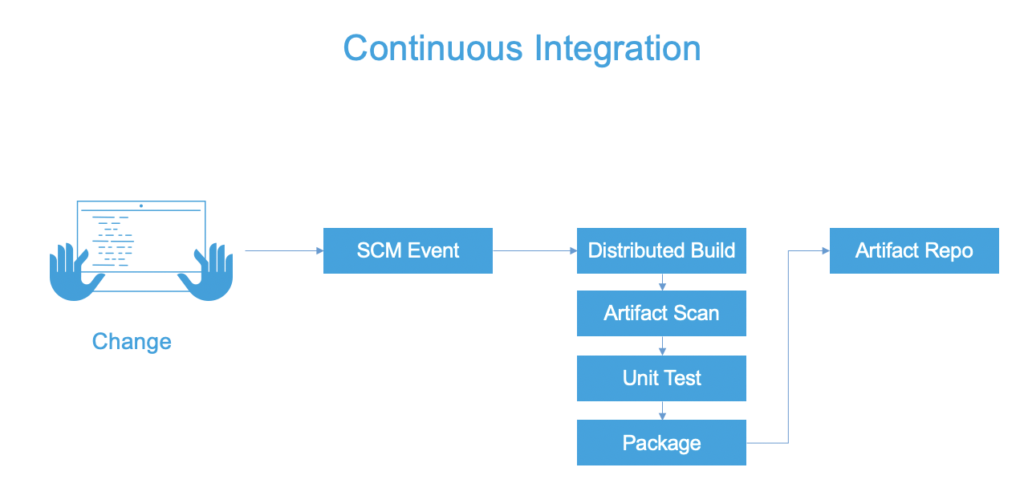
Continuous Integration is the automation of builds and (early) tests. Depending on your source control/version control strategy, code changes for a bug fix or new feature need to be merged/committed into a branch in the source code repository. No matter which side of the mono-repo vs. multi-repo argument you are on, a build - and eventually, release artifacts - will be created as part of the Continuous Integration processes.
Why it’s Important
Rarely do you work alone as a software engineer. Integrating your features/bug fixes into the application is a common task for a software engineer. The ability to merge ideas quickly is the big allure of Continuous Integration. With CI, our code the code is built, validating that the basics of the merge are successful and the tests are executed, providing a fundamental validation that our changes haven’t obviously broken anything.
With modern systems, the build and packaging steps can be different. In JAVA development, for example, the JAVA build produces a JAR file. Then that JAR file is packaged into a Docker Image for deployment.
Three pillars that Continuous Integration solves for is having the builds be repeatable, consistent, and available. Modern Continuous Integration platforms allow for scaling of the builds (having the builds available when needed vs. having your local machine pegged).
Best Practices
With Continuous Integration, keeping the automated builds fast is key. As this process will be run multiple times a day, with triggers around each commit or merge, time waiting for results can snowball. A challenge observed with Continuous Integration is overstepping into other Continuous pillars, like overburdening Continuous Integration platforms into Continuous Delivery.
Confidence in the build and deployable packaging is different than confidence in the deployment and subsequent release. Being strategic in where to apply parts of your test suite is needed in order to avoid overburdening the Continuous Integration process. A line in the sand should be that Continuous Integration tackles artifact-centric confidence-building (for example, unit tests and artifact scans).
Tests that take into account other artifacts and dependencies and/or application infrastructure are better-suited for the Continuous Delivery process. After the build is checked into a central repository, the next step to getting your idea into production is the promotion/deployment process.
Continuous Delivery
Continuous delivery keeps your codebase deployable at all times. Confidence-building steps are crucial to any engineering team making changes. Continuous Delivery is the automation of steps to safely get changes into production. Typically, Continuous Delivery includes a human approval or decision point at some point in the pipeline before production.

Why it’s Important
Continuous Delivery brings all of the testing steps, incremental/environmental deployments, and validation steps to safely get changes into production.
Continuous Delivery builds on top of Continuous Integration by automating the entire software delivery process, from code changes to production deployment. This includes automated testing, deployment, and release processes. Continuous Delivery ensures that software can be deployed to production quickly and reliably, which is essential for businesses that require frequent software updates and changes.
Continuous Deployment
What it is
Continuous Deployment is a variation of Contniuous Delivery where automation is complete and all the decision points are can be made by policy. If your tests and rollback capabilities are are excellent, you may not need to rely on a manual decision to deploy to production, simply deploy to production if the tests pass and rollback if there are troubles detected in production.
How it Works
The pipeline starts the same way as Continuous Delivery. Code merges trigger automated builds and tests. The difference comes at the end.
Instead of stopping at staging, the pipeline continues. If all quality gates pass, the deployment proceeds to production automatically. Monitoring watches for issues. If problems surface, automated rollbacks can revert changes.
This approach demands mature practices:
- Comprehensive automated testing
- Strong monitoring and observability
- Fast feedback loops
- Reliable rollback mechanisms
- Feature flags for incomplete work
Teams practicing Continuous Deployment trust their automation completely. They've removed the safety net of human review. In exchange, they get maximum speed.
Continuous Delivery vs. Continuous Deployment: Understanding the Differences
The practices differ in deployment trigger, but the implications run deeper.
Aspect |
Continuous Delivery |
Continuous Deployment |
|---|---|---|
Deployment trigger |
Manual approval required |
Fully automated |
Who decides when to ship |
Product, business, or release managers |
The pipeline (if tests pass) |
Release cadence |
On-demand or scheduled |
Continuous (often multiple times daily) |
Coordination overhead |
Enables cross-team planning |
Minimal coordination needed |
Rollback decision |
Manual assessment of impact |
Automated based on metrics |
Feature readiness |
Can hold incomplete features |
Requires feature flags for WIP |
Change batch size |
Can batch related changes |
Every commit is a potential release |
Regulatory requirements |
Easier to meet approval processes |
May conflict with some compliance workflows |
Testing confidence |
High confidence needed |
Absolute confidence required |
Best for |
Teams needing release control |
Teams optimizing for speed |
Continuous Delivery and Continuous Deployment Best Practices
Whether you choose Continuous Delivery or Continuous Deployment, some practices apply to both.
1. Automate Everything Before Production
Both approaches require automation for builds, tests, packaging, and staging deployments. The only difference is the final step. Build powerful pipelines that handle complexity while staying maintainable.
- Standardize pipeline structure across services
- Make pipeline configuration part of the codebase
- Treat pipeline failures with the same urgency as production incidents
- Test your automation regularly
2. Use Feature Flags for Incomplete Work
Don't let incomplete features block deployments. Ship code with flags disabled. Turn flags on when ready.
This works for both approaches but is mandatory for Continuous Deployment.
- Default flags to off in production
- Remove flags after rollout completes
- Track flag technical debt
- Use flag management platforms for consistency
3. Deploy Small, Deploy Often
Smaller deployments mean lower risk. Issues are easier to identify and fix. Rollbacks have less impact.
- Keep pull requests small and focused
- Merge frequently to avoid integration pain
- Deploy individual services independently
- Avoid batching unrelated changes
4. Monitor Everything
You can't catch what you can't measure. Observability tells you whether deployments succeeded. Use analytics and insights to track trends and identify patterns across deployments.
- Track key business metrics, not just technical ones
- Correlate deployments with metric changes
- Set up alerts for anomalies
- Make dashboards accessible to everyone
5. Practice Rollback
Rollback should be boring. If it's stressful, you'll avoid it. If you avoid it, small problems become big ones.
- Automate rollback so it's one command
- Practice rolling back in staging
- Measure rollback speed
- Use deployment strategies that make rollback automatic
6. Build Deployment Strategies That Match Risk
Not all changes carry equal risk. Match your strategy to the stakes, and ensure your platform can deploy anywhere your infrastructure requires, whether it is cloud, on-prem, or hybrid.
- Use rolling deployments for standard changes
- Use canary releases for high-risk changes
- Use blue-green for zero-downtime requirements
- Test deployment strategies in staging
7. Measure Pipeline Health
Fast pipelines encourage good habits. Slow pipelines encourage shortcuts. Visualize your DevOps data to identify bottlenecks and track improvements.
- Track deploy frequency
- Measure lead time from commit to production
- Monitor change failure rate
- Track mean time to recovery
Moving from Continuous Delivery to Continuous Deployment
Most teams start with Continuous Delivery and evolve toward Continuous Deployment as their practices mature.
The transition requires building confidence in automation. Here's how to get there:
Step 1: Automate the Deployment Process
Remove manual steps from deployment. If staging deployments require clicking buttons or running scripts, automate them first. Speed up builds with incremental builds that only rebuild what changed.
Step 2: Increase Test Coverage
Add tests until you trust them. This means unit tests, integration tests, and end-to-end tests that cover critical paths.
Step 3: Add Monitoring and Alerting
Deploy monitoring before removing manual gates. You need visibility before you can trust automation.
Step 4: Deploy More Frequently
Increase deploy frequency while keeping manual approval. This builds confidence in the pipeline and reduces batch size.
Step 5: Start with Low-Risk Services
Don't convert everything at once. Pick a low-traffic service or internal tool. Make it fully automatic. Learn from the experience.
Step 6: Remove the Manual Gate
When the pipeline runs smoothly for weeks without intervention, remove the approval step. Keep watching closely at first.
Step 7: Expand Gradually
Apply lessons learned to other services. Build standards so each service doesn't start from scratch.
Continuous Delivery and Continuous Deployment: Choosing Your Path
Both Continuous Delivery and Continuous Deployment solve the same problem: getting code from merge to production safely and quickly. The difference is who presses the final button.
The right choice depends on your context. Most teams start with Continuous Delivery and stay there. Some evolve to Continuous Deployment as their practices mature. A few need the control that Continuous Delivery provides permanently.
Harness helps teams implement both approaches. Automated pipelines handle builds, tests, and deployments across environments. Monitoring integration provides deployment verification. Rollback automation reduces risk. Whether you need manual approval gates or want fully automatic releases, Harness supports your delivery model.Automate the Build and Testing Process with Harness
The Harness Platform allows you to have an entire end-to-end CI/CD pipeline so your ideas can truly reach production in a safe manner. No matter if you are looking to deploy to several disparate pieces of infrastructure or orchestrate multiple confidence-building steps and testing automation, Harness can help your dev team achieve a push-button release.
If you have not already, feel free to sign up for the Harness Platform today. If you're not at that stage yet, feel free to do some further reading. We have a great eBook for you on Pipeline Patterns that may be useful.
Continuous Delivery vs. Continuous Deployment: Frequently Asked Questions (FAQs)
Here are a few questions we found in different DevOps communities, which can help describe the similarities and differences further.
What differentiates deployment and release in the Continuous Delivery pipeline?
A deployment is an act of installing/activating the software/binaries. During a deployment, if an existing version is there, then uninstalling/deactivating the previous version takes place. A release is the culmination of all the activities to get changes safely into production. As part of a release, there is a deployment component. Different release strategies, such as a canary release, take advantage of incremental deployment strategies. Releases are usually signed off on and a record of all the events that lead up to a change or new version of the application (the new stable version) is created.
What is the checklist for deployment pipeline in Continuous Delivery?
A successful deployment validates that features work as expected. From a technical perspective, you shouldn't violate SLAs, SLIs, or SLOs. From a functional perspective, users should adopt the changes without usage drops. Your checklist should verify that QA goals like test coverage are met, changes pass soak tests, and the system can handle scaling requirements. Harness automates these validation steps throughout the pipeline.
Can you have Continuous Deployment without Continuous Delivery?
No. Continuous Deployment is Continuous Delivery plus automatic production releases. You need the foundation of Continuous Delivery (automated testing, staging environments, deployment automation) before you can remove manual approval.
Does Continuous Deployment mean no code review?
No. Code review happens before merge, not before deployment. In fact, teams practicing Continuous Deployment often have stricter review processes because there's no manual safety net after merge.
Is Continuous Deployment too risky for production systems?
Not inherently. The risk depends on your practices, not your deployment model. Teams with strong testing, monitoring, and rollback can deploy continuously with less risk than teams with weak practices and manual gates.
Can regulated industries use Continuous Deployment?
It depends on the regulations. Some require documented approvals before production changes, which conflicts with automatic deployment. Others care about testing and validation, which Continuous Deployment can provide through automation. Check your specific requirements.
What percentage of tests should be automated for Continuous Deployment?
There's no magic number, but manual testing should be rare. If you're running manual test cases before every deploy, your automation isn't ready. Focus on automating critical paths and high-risk areas first.
How do we know if we're ready for Continuous Deployment?
You're ready when manual gates feel like unnecessary overhead instead of safety. If deploys happen smoothly for weeks and approvers just rubber-stamp without finding issues, the manual step adds no value.